





Bug reporting takes time. Here’s how AI helps teams work more efficiently
Bugs are a common, everyday part of software development. We expect them, track them, and plan to fix them in the next release.
But what happens if there’s an issue that’s so critical that it simply can’t wait for the scheduled update?
Users may be blocked, data may be at risk, or the app simply stops working.
In such cases, teams don’t ship a regular update. Instead, they ship a hotfix.
Knowing what hotfixes are and how to use them helps you respond to problems quickly without making things worse.
So, let’s see what they are all about.
Table of Contents
Let’s start by defining the term.
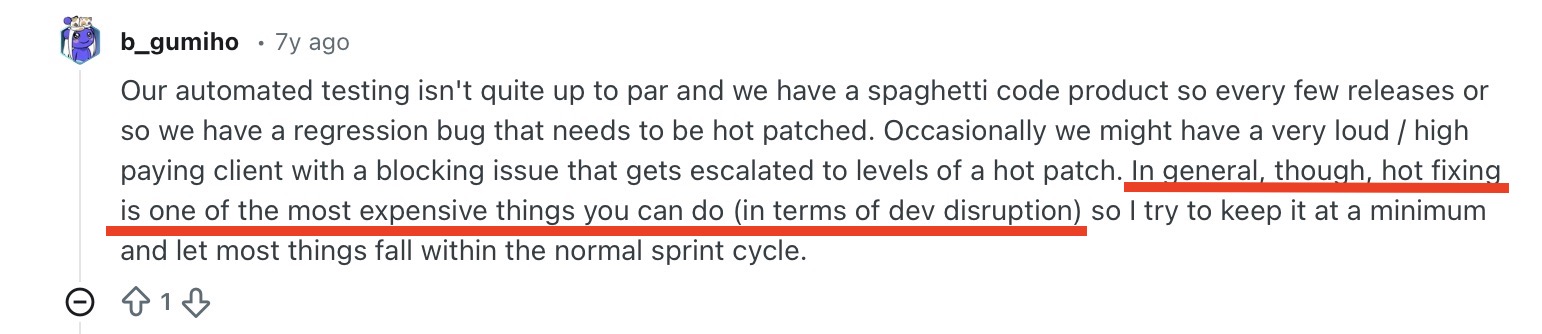
We’ll use a snippet from a Reddit discussion on patches vs hotfixes.

Take a look at the keywords that appear above to describe a hotfix:
It is clear that a hotfix is not a normal, regular update, but a reaction to a big problem. A more elegant way to put it would be to say that:
“A hotfix is a small, urgent update released outside the normal release schedule to fix a serious problem that can’t wait.”


Get unreal data to fix real issues in your app & web.
Another defining characteristic of a hotfix is that it’s done in a live system. That means the application is already in users’ hands when the issue appears.
Since there’s no quiet testing window, the fix has to be precise and safe enough to deploy without disrupting other flows or ongoing sessions.
So, hotfixes shouldn’t be your main way of fixing bugs.
If anything, they should be your last resort, and you should favor more structured work whenever possible.
Not to mention that they’re also expensive because they cause a disruption to workflows, as observed by another Reddit user.
That’s why most issues are better handled through normal release cycles, with proper testing and review, and why hotfixes are usually reserved for cases where waiting simply isn’t an option.
By now, it’s clear that relying on hotfixes for everyday bug fixing isn’t the best approach.
But they are still a valuable tool in specific situations.
Let’s look at the cases where shipping a hotfix is a better option.
The most evident use case for a hotfix is when a bug interferes with core functionality.
These are issues that:
A recent example comes from MindsEye, where a severe memory leak caused frequent crashes shortly after release.
The developers responded by shipping a hotfix outside the regular update cycle to stabilize the game and restore basic usability.

In cases like this, a hotfix allows teams to deploy a small, targeted change that fixes the immediate problem without waiting for a full release.
Waiting days or weeks in situations like this would only frustrate users further and risk losing them entirely.
So, a fast, targeted hotfix is often the only practical way to restore functionality and keep users from walking away.
Forbes reports that, according to IDC, 80% of consumers would ditch a company if their personal information was compromised in a security breach.
This figure is a testament to how important data security is to people.
And that’s why security vulnerabilities are one of the cases where hotfixes make sense. When a security flaw is discovered, there’s no time to wait for the next planned update.
The longer the issue stays open, the higher the risk of exploitation, so hotfixes are helpful here.
But don’t think that security vulnerabilities only happen to amateurs.
Even Apple has faced this situation.

In 2023, Apple discovered a serious vulnerability in the system that displayed web content inside apps.
The issue was already being exploited, meaning attackers could target real users before a regular update was ready.
To stop the damage quickly, Apple released a Rapid Security Response: a small, targeted security hotfix delivered outside the normal release schedule.
So, if your users’ security is at stake like in this case, you should seriously consider going the hotfix route.
Not every hotfix is about crashes or security.
Sometimes, the service technically works, but a bug ruins the experience to the point where users stop engaging with the app.
This can include:
This is exactly what happened with Dune: Awakening in September 2025, when a bug caused high-value loot to respawn every half second.
The game was playable, but the bug made normal gameplay meaningless.

Funcom, the video game developer and publisher behind the game, responded with a hotfix less than a day after launch to restore normal gameplay.
In cases like this, a hotfix helps contain the damage before a frustrating experience makes users leave.
It’s best to avoid hotfixes, but when there’s a serious issue, and you really do need one, it helps to understand what the process usually looks like.
It starts when a critical issue is identified in the live app, often through crashes, monitoring alerts, or user reports.
A hotfix doesn’t follow the same path as everyday development.
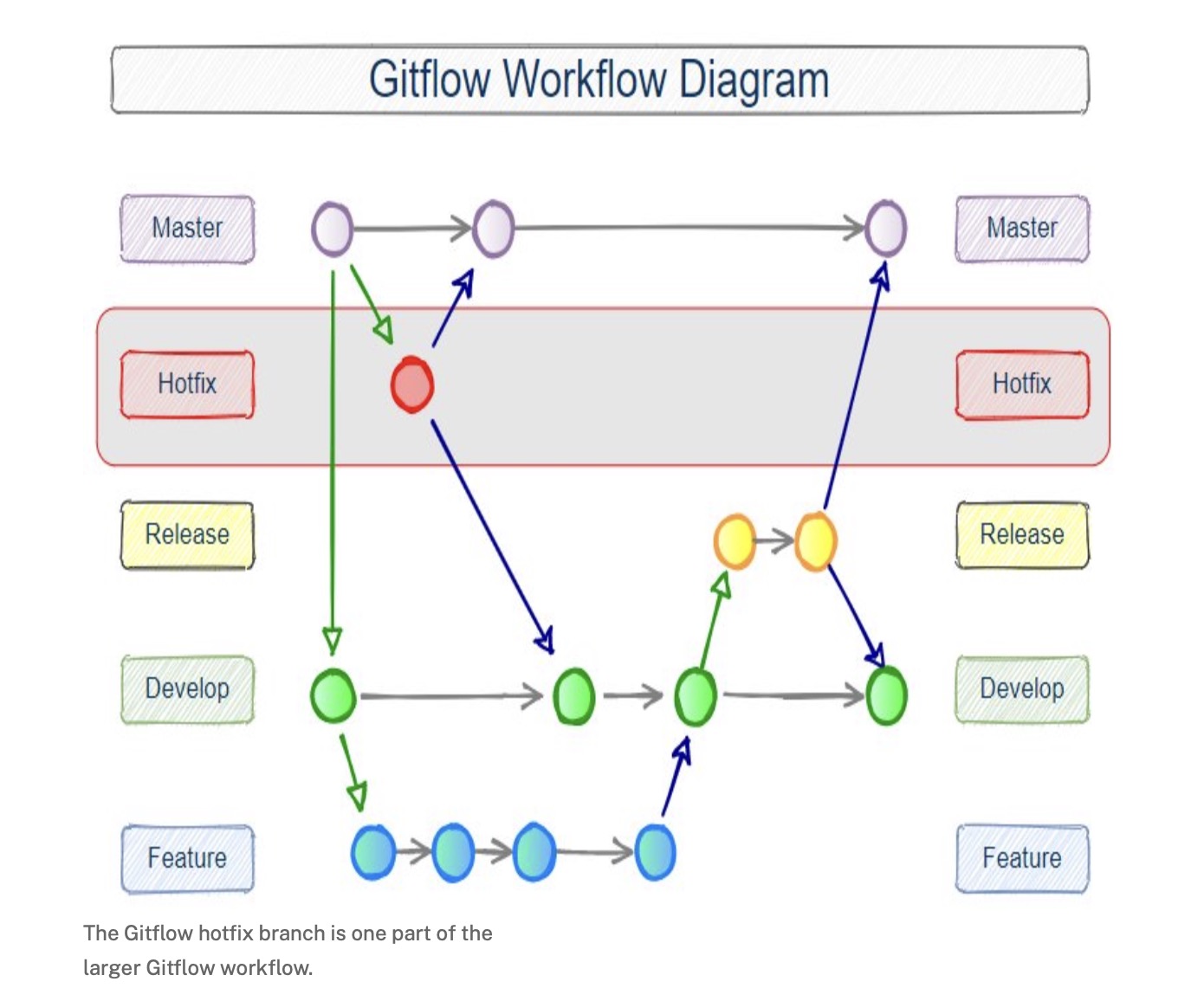
As you can see in the diagram below, it takes a shortcut.
Instead of going through the usual flow of building features, testing them over time, and bundling them into a planned release, the team branches a hotfix directly from the live version of the product.
They focus only on the specific issue, apply a small fix, and run quick checks to make sure that the problem is resolved and nothing else breaks in the process.
The team then deploys the fix to production as quickly and safely as possible and monitors logs, metrics, and user feedback to confirm the issue is resolved.


Capture, Annotate & Share in Seconds with our Free Chrome Extension!
Finally, they merge the hotfix back into the regular development flow so future releases include it too, without disrupting ongoing feature work.
If that feels like a lot to take in, it helps to look at the hotfix process step by step, so here’s a summary of how a hotfix is implemented.
| Step | What happens |
| Issue detected | The team spots a critical problem in the live app |
| Hotfix branch | A branch is created directly from production |
| Targeted fix | Developers fix only the specific issue |
| Quick checks | The team verifies the fix works and doesn’t affect other flows |
| Deploy | The fix is pushed to production as soon as possible |
| Monitor | Logs, metrics, and user feedback are monitored |
| Merge back | The fix is merged into the main development branch |
With so many steps skipped and reordered, it’s easy to see why hotfixes carry more risk than regular releases.
That’s why teams should try to avoid needing them in the first place, which we’ll talk about next.
Hotfixes solve urgent problems.
Fortunately, you can avoid them in most cases by catching issues earlier and limiting their impact when something does go wrong.
Here are a few practices that help keep hotfixes not the rule, but the exception.
Testing, testing, testing. We may have mentioned the practice once or twice.
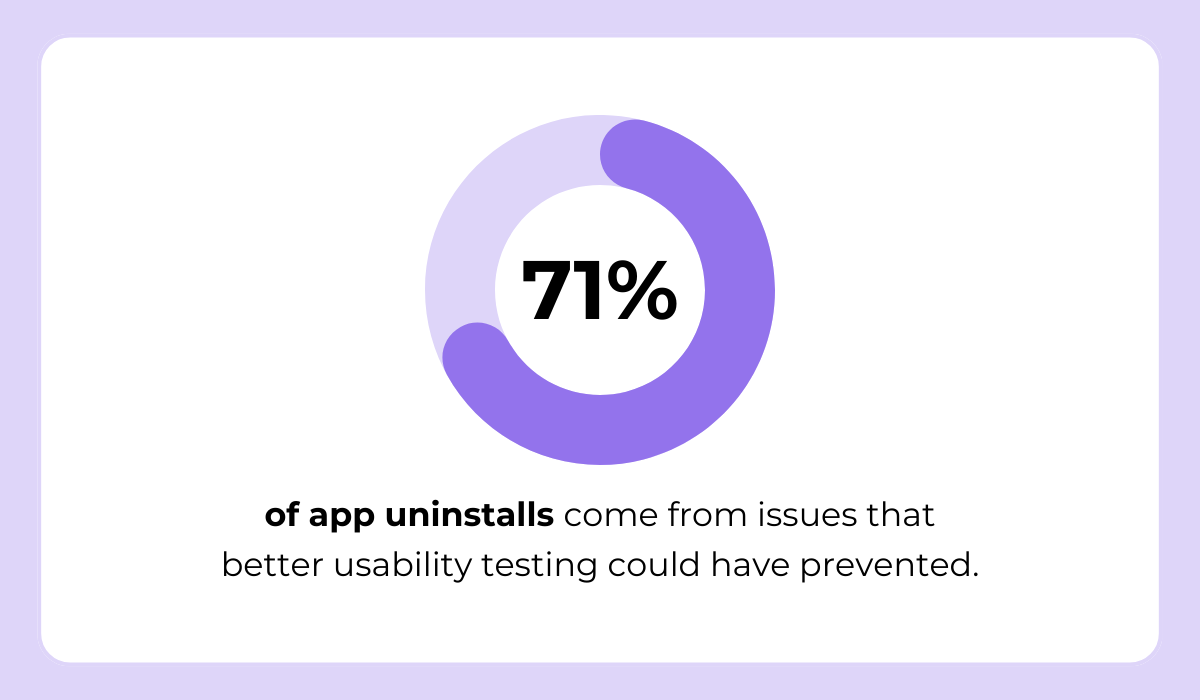
Seeing as 71% of app uninstalls are caused by issues that could have been avoided with proper usability testing, it’s clear that many problems never should have reached users in the first place.
That’s a huge loss, and it shows how crucial it is to catch issues early. Bugs not only damage your product but can also push your users to abandon it entirely.
So, at a minimum, testing should cover:
And the broader and more consistent your test coverage is, the fewer critical issues slip into production and force you into emergency hotfixes later on.
You can make your life easier by giving testers better tools while they’re testing.
When someone reports a bug with Shake, the SDK automatically captures the full context around that report, such as device details, OS version, network state, logs, and recent user actions.
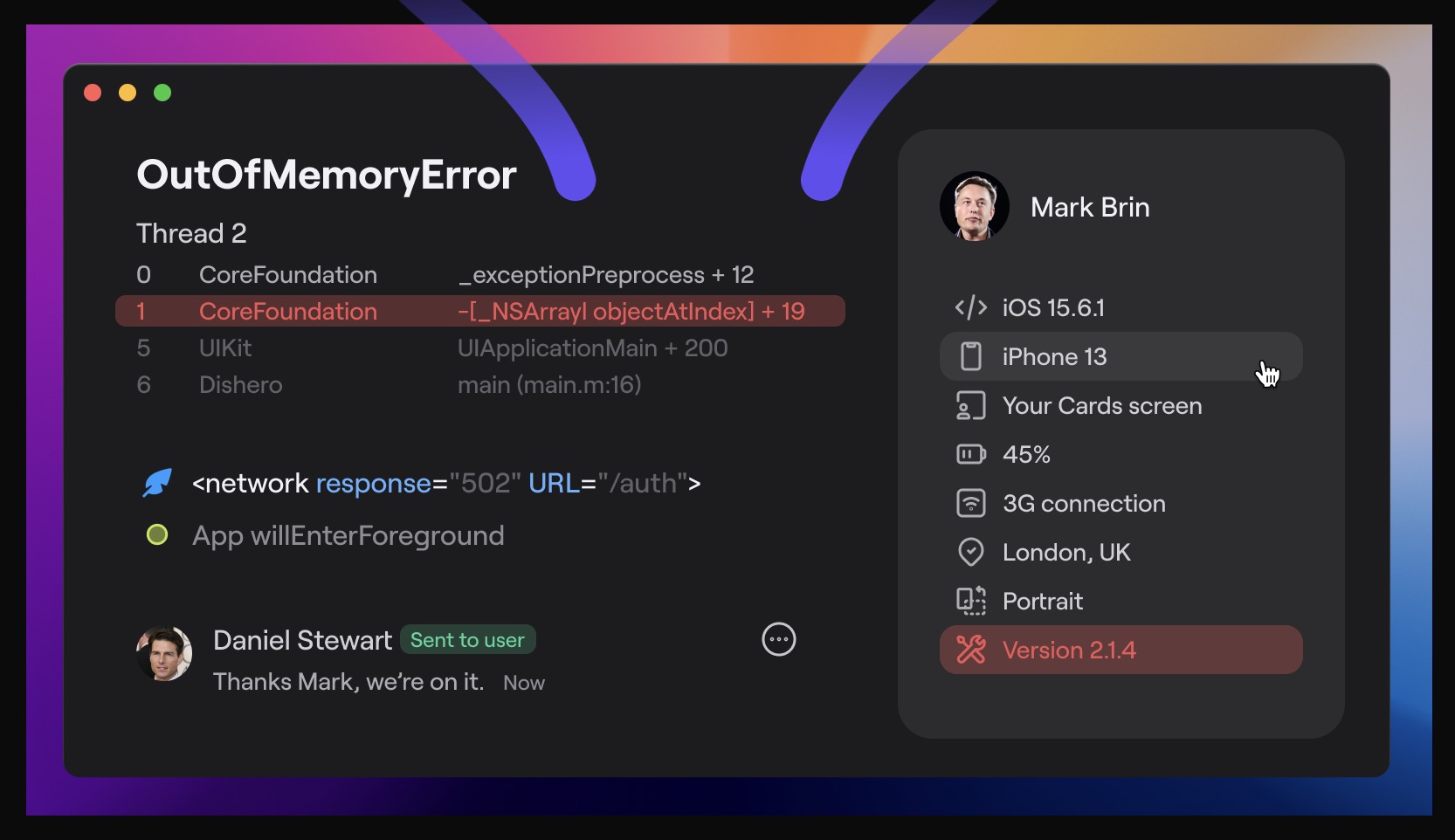
With a tool like Shake, testers no longer have to manually describe their environment or try to remember exact steps.
As a result, developers get clear, actionable reports from the start, which makes issues easier to reproduce and fix before they ever reach production.
Your next line of defense should be feature flagging.
Feature flags allow teams to enable or disable features instantly without redeploying code.
If something breaks, the team can simply turn the problematic feature off and avoid the need for a hotfix entirely while working on a safe fix behind the scenes.
You can think of feature flags as an on/off switch for new functionality, as depicted below.
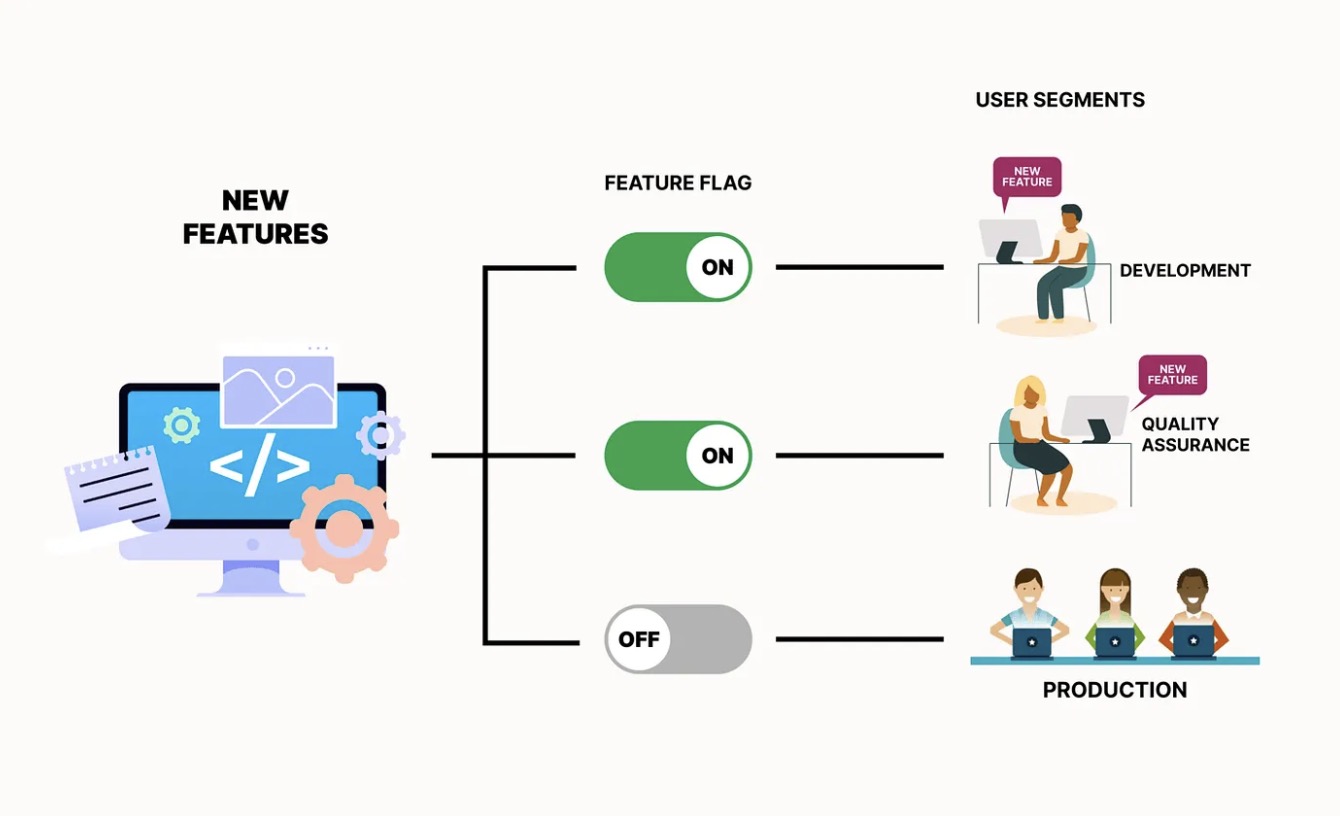
So, if an issue appears in the live version of the app, flipping the switch off immediately limits the impact, without rushing an emergency release.
This approach lets you investigate and fix the problem properly, instead of reacting under pressure with a hotfix.
Even with solid testing and careful releases, some issues only show up once real people start using your app.
That’s why you should collect user feedback early and continuously.
The sooner you note the issues, the easier they are to fix before they spread and turn into urgent problems.
There are several ways to collect feedback:
| Feedback source | What it helps you catch |
| In-app feedback | Broken flows, confusing UI, blocked actions |
| Support tickets | Repeated, high-friction issues |
| App store reviews | Widespread problems affecting many users |
| Usage analytics | Failed actions, unexpected behavior |
| QA and tester reports | Edge cases and environment-specific issues |
Essentially, early feedback helps your team spot patterns that you could easily miss with monitoring only, such as confusing flows, edge-case bugs, or features that don’t behave the way users expect.
When you act on this input quickly, you can often resolve issues through normal development instead of reaching for a hotfix.
To wrap this all up: we’re aware that we’ve spent a good chunk of an article about hotfixes dissuading you from using them.
That’s because the best hotfix is the one you never have to ship!
May your product never need a hotfix. This is our wish for every team that ships software.
A codebase that doesn’t require emergency fixes is usually a sign that you’re doing great with testing, releases, and monitoring.
But if your app does end up needing one, you now know when a hotfix actually makes sense, and how to approach it.
If you use them sparingly and with care, hotfixes can be an excellent safety net that protects your app, your team’s work, and your users.
From internal bug reporting to production and customer support, our all-in-one SDK gets you all the right clues to fix issues in your mobile app and website.
We love to think it makes CTOs life easier, QA tester’s reports better and dev’s coding faster. If you agree that user feedback is key – Shake is your door lock.
Read more about us here.

Add to app in minutes

Doesn’t affect app speed

GDPR & CCPA compliant

Unexpected things pop up
Just like bugs in your app or web 🐛 Fix them now with just one reporting tool.
