





Bug reporting takes time. Here’s how AI helps teams work more efficiently

Key takeaways
“Your app sucks!” or “Too many ads!” type of app reviews aren’t the only ones in your “negative” category of reviews.
The reality is much more nuanced.
A user can be frustrated by a range of issues in your app, some of them within your control, some of them outside of it. Each of those shines a light on a different aspect of your app.
That’s why you can’t just ignore them or reply to users with a generic response.
If you do, you’ll waste time, miss urgent problems, and overlook valuable feedback—not to mention you’ll lose users.
The good news is it’s easy to learn how to differentiate between them, and that’s exactly what we’ll show you in this article.
Table of Contents
These reviews mention app crashes, freezing, or the app failing to open.
In other words, anything that negatively impacts an app’s performance of its core functions.
Users often express frustration because the app becomes unusable, especially during important actions like payments or sign-ins.
This type of review signals urgent technical issues that require immediate investigation.
That’s why you must take them very seriously. Otherwise, you risk app uninstalls and lower ratings in the app store.
This Reddit thread about a banking app below shows just how frustrating an app freeze can get for a loyal app user of 10 years.
Not only do they have stability issues, but they also can’t solve the issue on the web version of the app or with customer support.
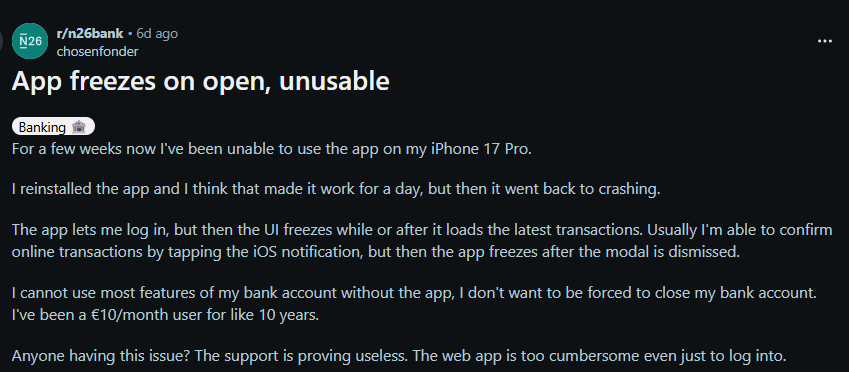
Apparently, airing their frustration on Reddit was their last resort. But if the company had dealt with this stability issue ASAP, this wouldn’t have happened.
The user wouldn’t doubt their loyalty, and potential users who saw this thread wouldn’t leave with a bad impression of this app.


Get unreal data to fix real issues in your app & web.
So, when you encounter reviews that signal serious stability issues, you must reply immediately to affected users and solve the problem.
The faster you reply and resolve the issue, the happier users will be, and your brand reputation will stay intact.
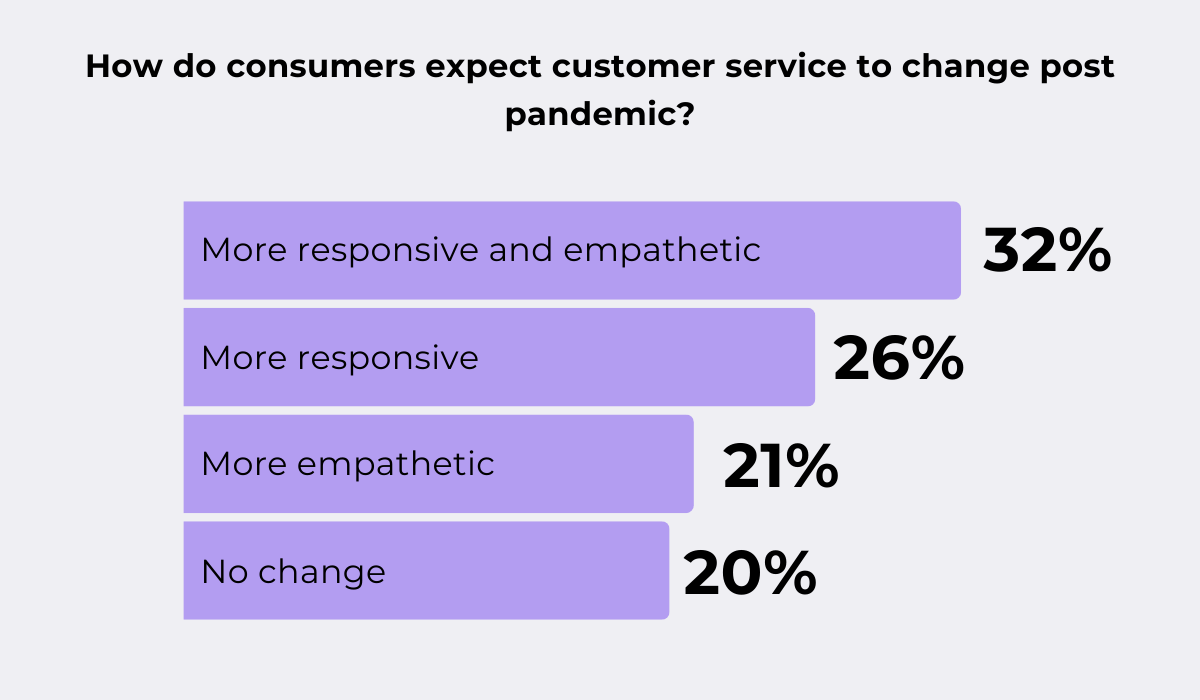
In fact, timely resolution is one of the most important aspects of good customer service, as shown in Hiver’s report on customer service during COVID-19, when fast feedback was crucial for people.
The fast pace of everyday life, and with it, instantaneous gratification, makes users very time-sensitive, so they demand a brand to keep pace with them.
So, to keep these reviews from happening often, your team must always quickly become aware of the causes of those stability issues.
Now, getting to the bottom of this can be tricky because an app may malfunction for many reasons, from network or backend issues to bad performance monitoring.
To keep your stability levels as high as possible, make sure to test your app at every stage of the development cycle, rely on crash reporting tools like Shake, and keep your product as decluttered as possible.
Poor app stability is the first thing a user becomes aware of and one of the main reasons for an app uninstall. That’s why prioritizing bad reviews related to it is
Some users leave reviews describing broken features, error messages, or unexpected behavior.
These reviews often include valuable clues about reproducible issues.
Instead of dismissing them as complaints, it’s important to treat them as bug reports that can guide debugging efforts.
When you notice reviews like these, make sure to leave a reply that’s both empathetic and valuable for the user.
If more context is missing, ask follow-up questions in order to tackle the issue without wasting your and the user’s time.
Along with stability complaints, bug-related reviews should be the top priority.
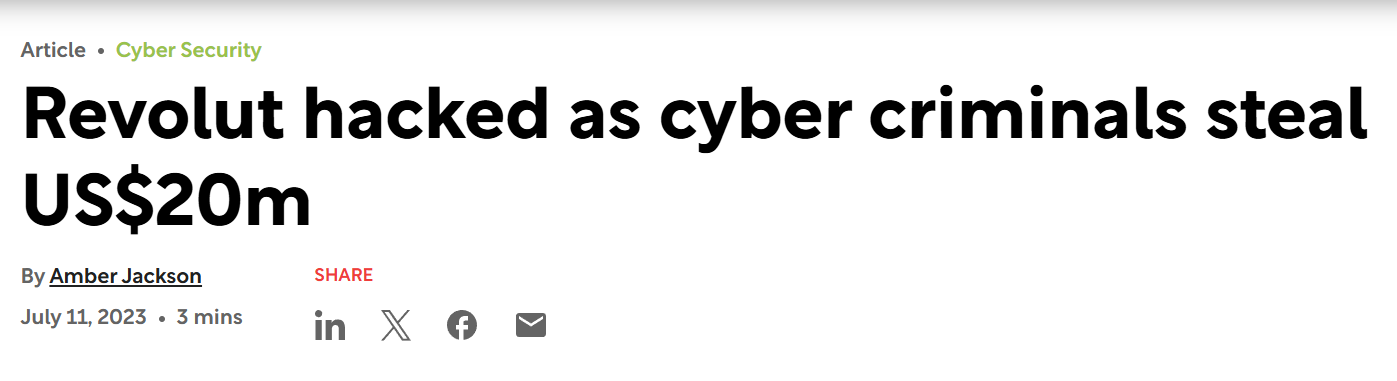
A bug, especially when left untreated, can escalate into issues that seriously harm your company, just like it happened to the popular finance app Revolut in 2022, when a bug turned into 23 million dollars lost to cybercriminals.
To prevent these issues, it’s important to keep an eye on reviews that mention problems with audio or video, unexpected app crashes, or excessive permission requests.
But, instead of going through your bug reports manually, use in-app feedback tools, like our very own Shake.
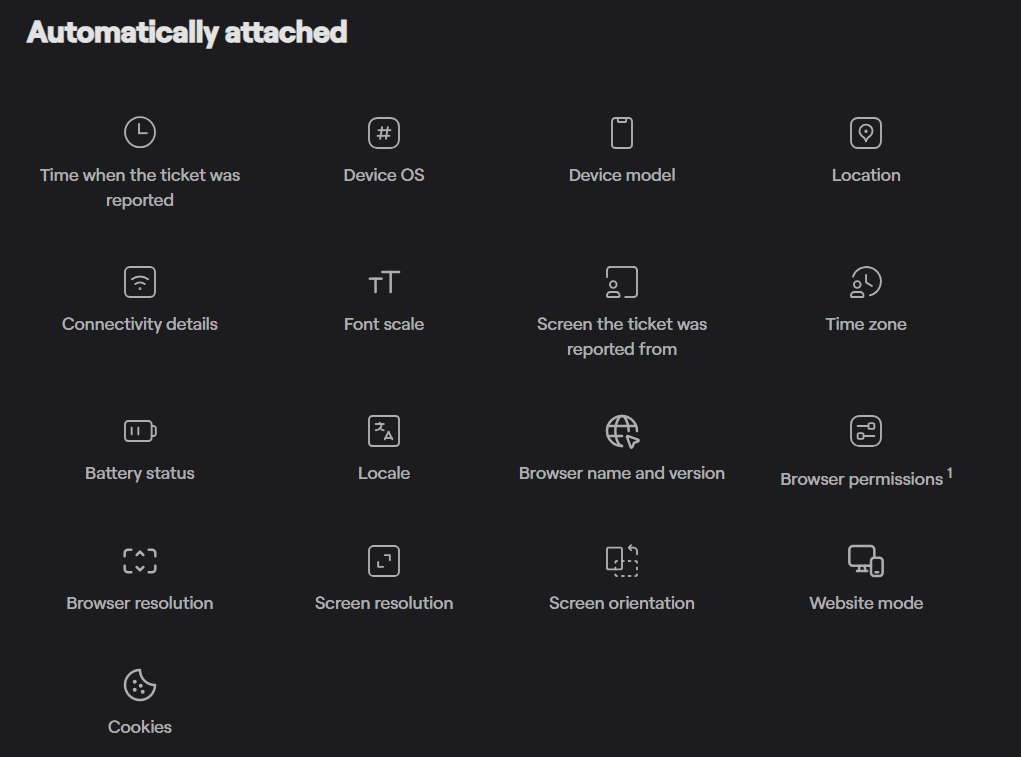
It helps capture screenshots, logs, and device details so teams can diagnose and resolve problems faster.
With more than 30 data points automatically attached to user bug reports, Shake creates a shortcut to significant insight about user behavior, which is much more than with just user reviews.
Reviewers, especially non-tech-savvy ones, mostly describe their problem as briefly as possible.
But when using Shake, users get access to a ticket screen where they can write about their issue in more detail and complement it with visual material, like screenshots and videos.
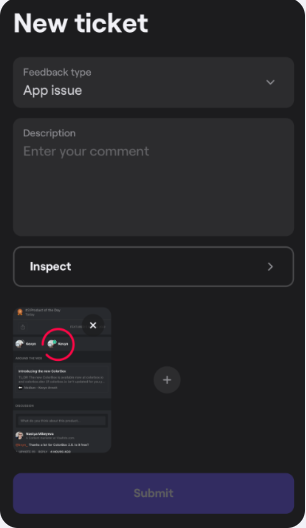
Not only does this give more context to the developer, but it also raises the chance of quickly solving the user’s issue because there’s no middleman in the process.
“I can’t find the app’s settings.” or “Dark mode doesn’t work as it should.” type of reviews are made by users frustrated or confused by the app’s interface and usability aspects.
Comments like these are often triggered by poor onboarding, cluttered layouts, or unclear navigation.
The danger is that users may easily churn and delete the app, so you should reply to them as soon as you can.
Otherwise, you risk losing a significant part of your user base. In fact, research showed that more than 1 in every 2 apps that are installed, users uninstall them within 30 days of being downloaded.
This means that you need to be quick in replying to the user and solving their issues.
However, if the user didn’t give you enough details for you to reconstruct the context, ask for more information in your reply.
When you confirm it’s a UX or UI issue, it’s time to get down to work.
Here’s a great example of a helpful reply to a user complaint made on a Reddit thread about the website’s official mobile app.
A user complained about a UI issue that turned out to be a bug.
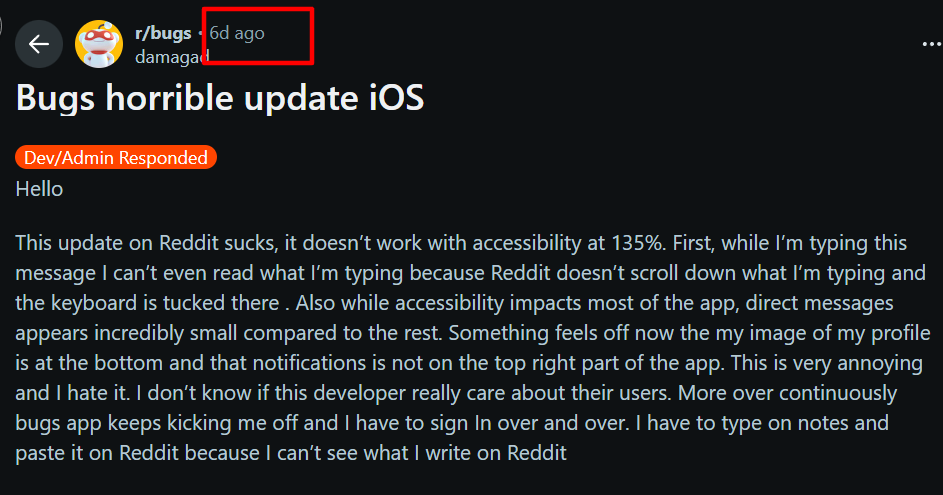
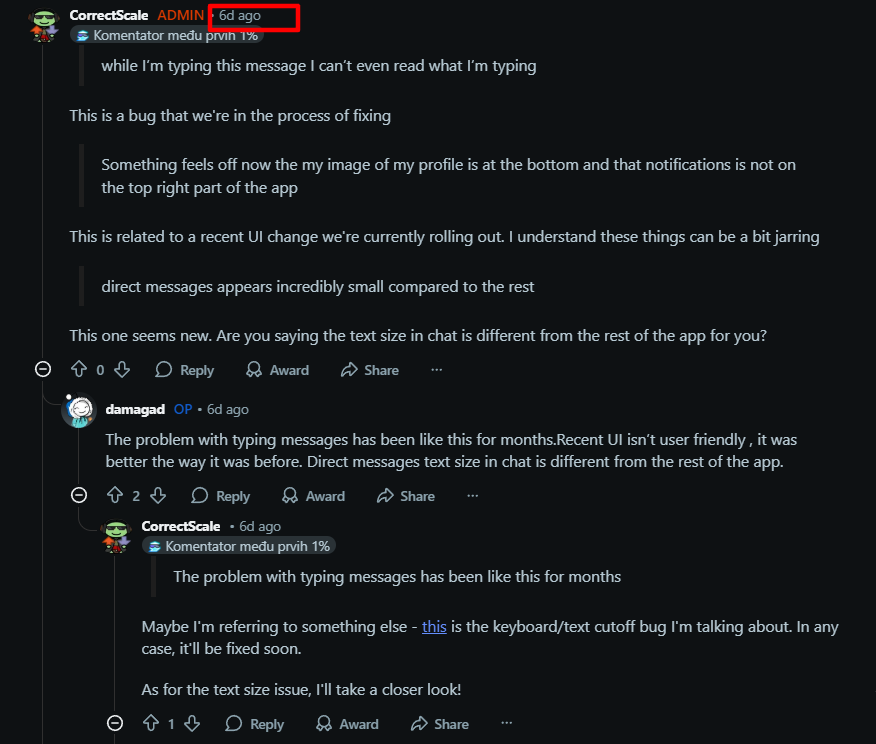
Notice how the subreddit’s admin replied fast (on the same day, according to the timestamps).
They continued the conversation with the frustrated user until they clarified what they were talking about, but still left open the option that they may be wrong.
Also, they showed understanding (“I understand these things can be a bit jarring”), which signals they took the issue seriously.
You can solve usability issues and reduce user feedback like the one shown by focusing on UX improvements and usability testing.
Usability testing will be especially important because you’ll see from the users themselves how easy it is for them to complete tasks or navigate the app.
Also, you’ll be able to gain deeper insight into the current behavior and preferences of your users.
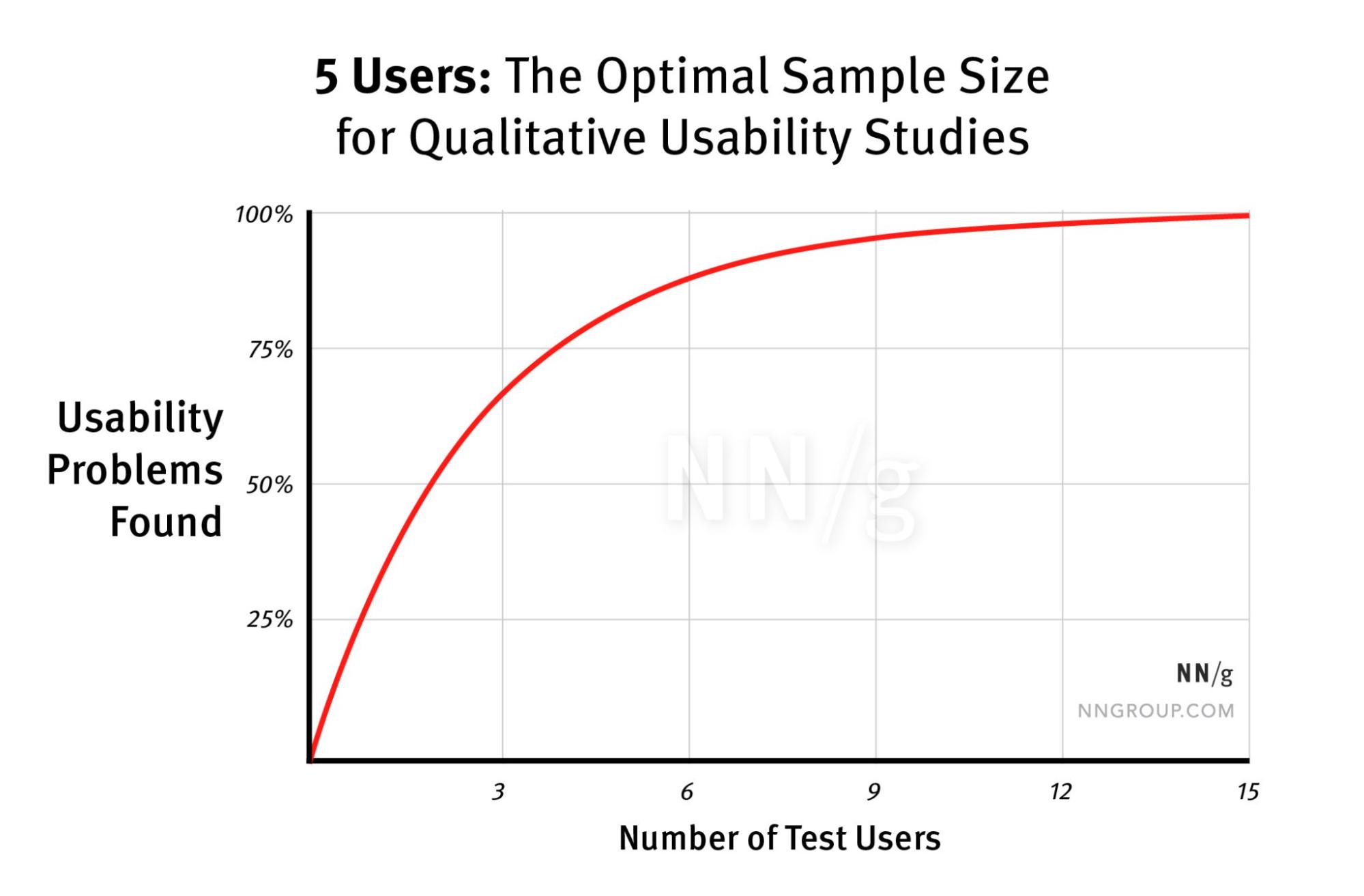
The good news is, you don’t need thousands, or even hundreds, of users that can help you catch usability issues.
According to this study by the Nielsen Norman Group, even five users are enough to make the testing worthwhile.
When you combine real user feedback with technical feedback from your QA engineers and UX designers, you’ll get a holistic view of your product.
To make for an effortless user experience, make sure to complement your efforts with additional tools and principles, like Jacob Nielsen’s evergreen principles for interaction design.
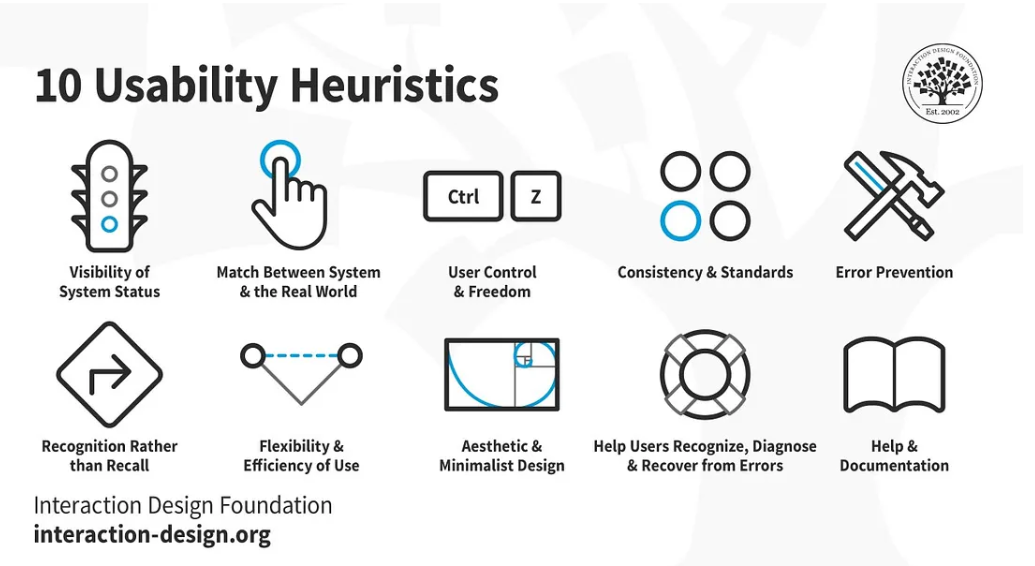
These principles always put the user first and, because of their flexibility, can be used even in today’s app development processes.
It’s safe to say that when you combine usability testing with active review management, you’re closer to providing a seamless experience for your user base and, with it, better ratings.
Another type of negative user feedback is complaints related to missing features and functionalities.
When a user expects a feature, but it’s not (still) available, this can prompt them to leave a 1- or 2-star rating and a negative review.
If you get enough of those, especially in the App Store, the new AI summary feature may pull from those reviews, and potential users will judge your app’s performance by these summaries that may not present your users’ feedback adequately.
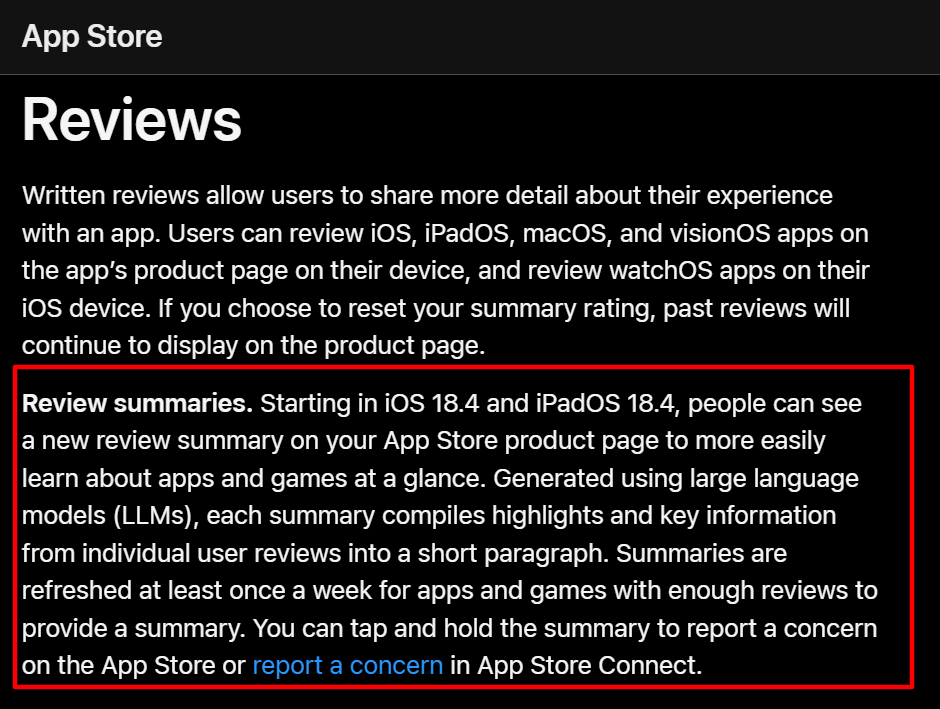
However, this type of feedback can be a goldmine if you want to improve your mobile app with new and relevant features.


Capture, Annotate & Share in Seconds with our Free Chrome Extension!
When replying to a review, it’s important to acknowledge a user’s frustration and thank them for their suggestion.
If your team is currently working on the same or a similar feature, make sure to mention it in your reply and invite the user to stay tuned.
This may prompt them to edit their review or even change their rating after the new feature is deployed.
That’s good news, because according to a study by Apptentive, moving a three-star app to four stars can lead to an 89% increase in conversion.
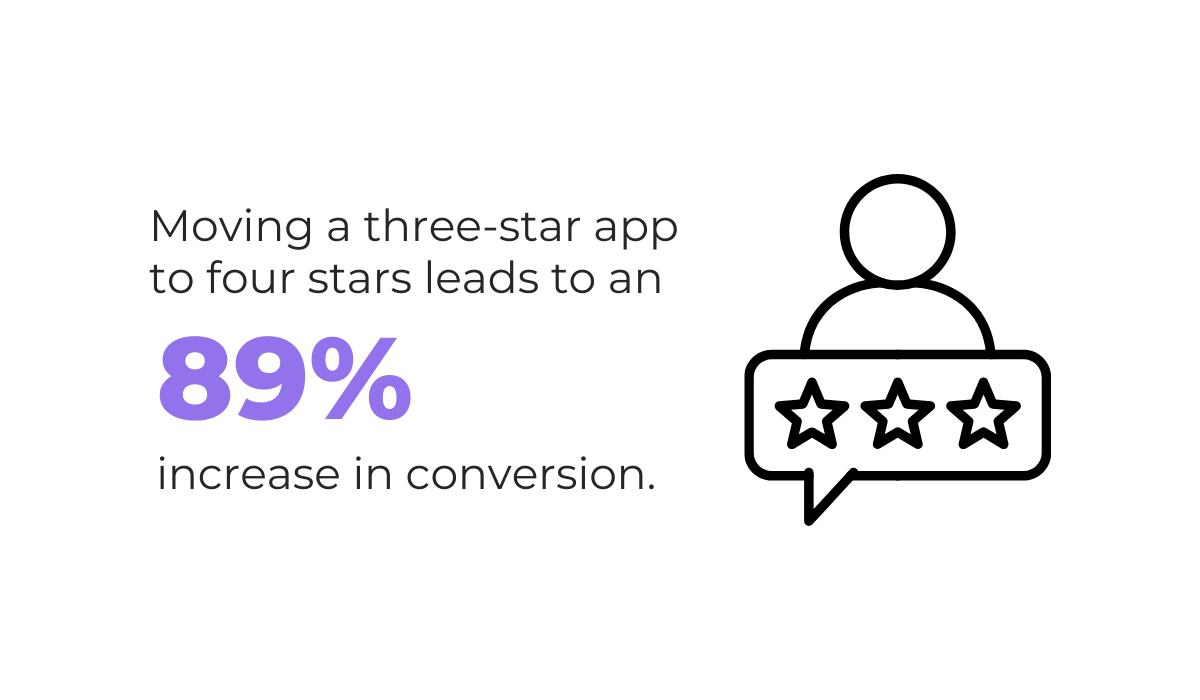
That’s why it’s important to reply to and keep track of user feedback on missing functionalities.
It can show you firsthand what your audience prioritizes, and if you can provide them with features that streamline their experience, everyone wins.
The last one on our list is negative feedback that doesn’t actually say anything.
Most of these contain vague phrasing like “I don’t like this app,” or they’re just emotional venting because of unmet expectations.
Here’s an example of a review on Chai.ai’s Google Play page.
The user is frustrated because they feel 70 free messages on the app are not enough for them.
That’s a legitimate opinion, but calling an app a “scam” because of their thwarted expectations is uncalled for.

As you can see, one-star reviews like these can be tricky to assess and easy to ignore.
Still, they indicate dissatisfaction, and you should reply in most cases.
Responding politely and offering support can help repair user perception because the way you interact with users, regardless of whether they’re right or wrong, is being watched by others, especially potential users.
Also, if you manage to elegantly handle the issue and give some value to the affected user, they may later update their review or even up their rating.
Yes, it may seem like a slight chance, but it’s still worth doing.
Regarding that, App Tweak, the app management software, reports that apps that respond to every single review can expect around 3% of users to update their review.
Of course, this works if you confirm beforehand that it’s a legitimate review, not one written by your competitor or a troll.
However, if you notice negative feedback with abusive or inappropriate language, it’s better to report the review to Google Play or the App Store.
This one above was made on an AI chat app’s Google Play profile.

The user is practically blackmailing the app to add a feature so they’ll bump their rating from a 1- to a 5-star review.
This one doesn’t contain inappropriate language per se, but may sound borderline abusive.
Reviews like these demand carefulness and cooled-down emotions, because a wrong step may spell trouble later.
But despite its lack of constructiveness, negative feedback is still information that can help you in measuring your audience’s reactions and user experience.
And that wraps up our article.
Negative user feedback may seem harsh, but when you set emotions aside, it can become a powerful tool in the improvement process of your mobile app.
Make sure to differentiate between constructive and non-constructive reviews; always show that you take users’ concerns seriously with your replies and find a silver lining in each of them.
After all, users are the ones apps are made for, and their feedback should always be a guiding light in app development.
From internal bug reporting to production and customer support, our all-in-one SDK gets you all the right clues to fix issues in your mobile app and website.
We love to think it makes CTOs life easier, QA tester’s reports better and dev’s coding faster. If you agree that user feedback is key – Shake is your door lock.
Read more about us here.

Add to app in minutes

Doesn’t affect app speed

GDPR & CCPA compliant

Unexpected things pop up
Just like bugs in your app or web 🐛 Fix them now with just one reporting tool.
