



Bug reporting takes time. Here’s how AI helps teams work more efficiently

Bug reporting has always been one of those tasks that slows teams down more than it should.
Issues often get reported without enough context, leading to a poor triage process and slower fixes.
If you’re looking for a tool that brings AI into the reporting workflow, this article is for you.
We’ll look at several AI-driven bug reporting tools, covering what each one does and where it fits, so you can find the right one for your team.
Table of Contents
Let’s start with Shake, our own bug and crash reporting tool built for mobile and web apps.
Shake covers the full reporting cycle, from the moment a bug is captured to the point where it’s triaged, assigned, and handed off to a developer with everything they need to fix it.
That end-to-end approach is what makes it stand out from simpler capture tools on this list.
Key features:
The feature set covers both the reporting side and what happens after the report lands.
When a user initially submits a bug report, Shake’s AI suggestions help them write a clear, detailed description, similar to what’s offered by tools like Jam.
But, on top of that, over 70 data points are automatically attached to every report, covering device info, network state, console logs, and more.
Once the report is in Shake’s ticket management system, Sheldon takes over.
Sheldon is Shake’s AI assistant, available directly on every ticket, and it reads all the attached data to suggest a priority level and recommend ticket tags with one-click actions to apply them instantly.
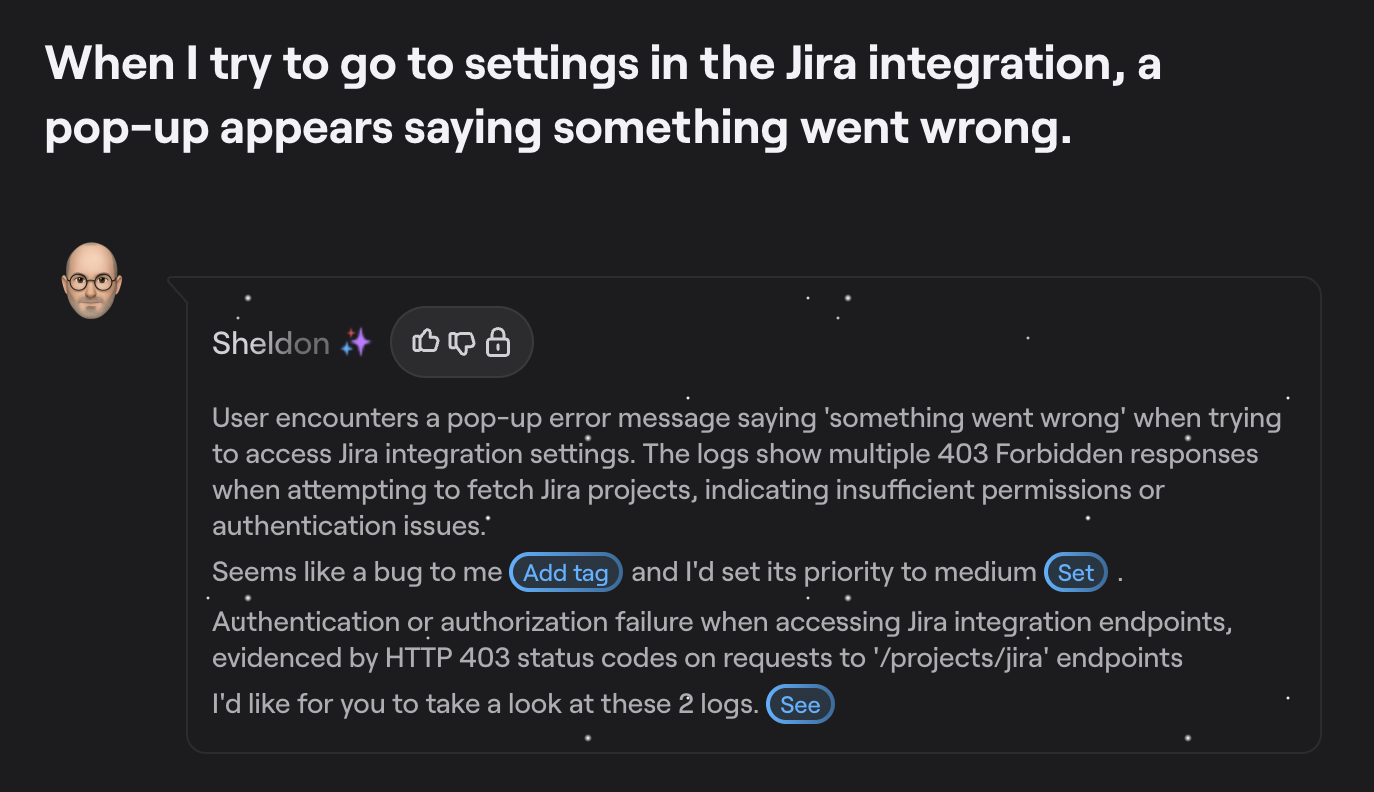
Sheldon also generates a quick summary of each ticket, highlighting what likely went wrong and suggesting next steps, which cuts down a lot of the manual work involved in reviewing incoming reports.
If you need another layer of analysis on a particularly tricky issue, Shake’s MCP server lets you connect your Shake ticket data directly to external AI agents like Claude or ChatGPT.
For instance, you can use some of the example prompts below and run them against your tickets.
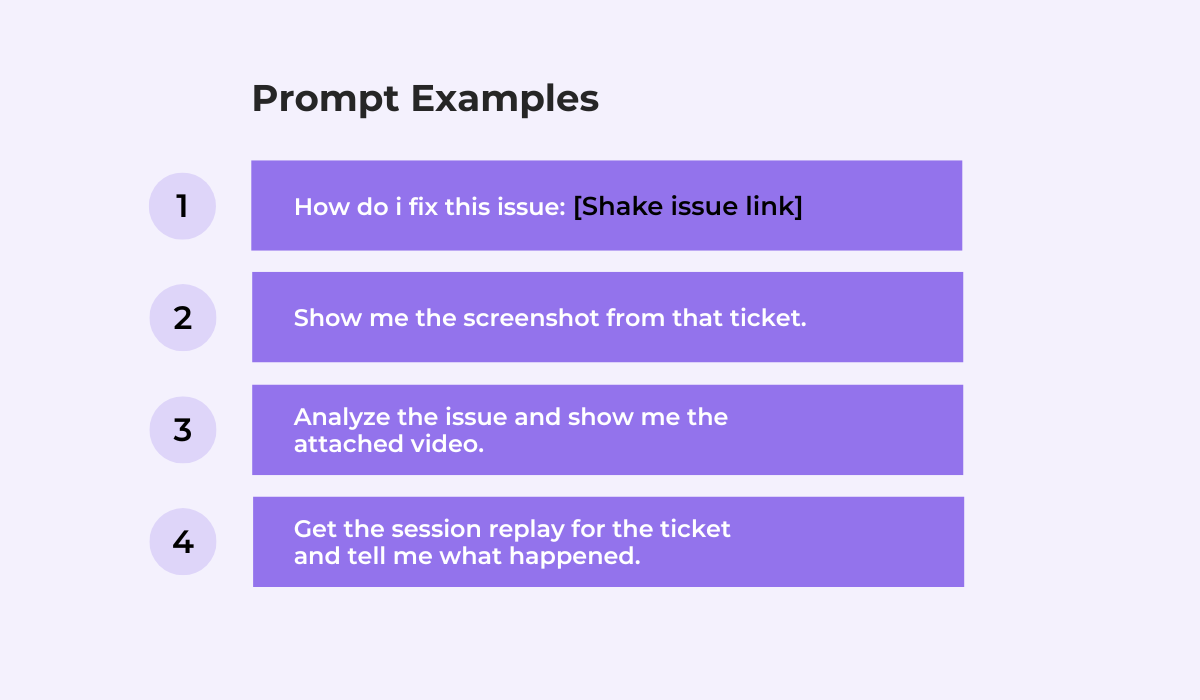
Since all ticket data, screenshots, and session recordings are already available through the MCP connection, you don’t need to copy anything across tools or switch context.


Get unreal data to fix real issues in your app & web.
All of this makes Shake a good fit for both internal QA and testing teams, as well as end users submitting reports from within the app.
Our tool also works across iOS, Android, Flutter, React Native, and web.
Pricing comes in three tiers: one limited free tier, and two paid tiers starting at $200 per month.

The Free plan covers indie developers and small teams getting started, with a 30-report monthly limit per app, while the Premium plan would be best for most development teams with established apps.
If you’re a startup, you can apply for a discounted Premium plan at $15/month for the first year.
Overall, of all the tools on this list, Shake offers the most complete AI integration across the bug reporting and debugging workflow.
Next, we have Bugasura, primarily a test management and QA platform.
Bug reporting is part of what it does, but the tool is built around a broader workflow that includes creating and managing test cases, tracking test runs, and organizing QA work across teams.
Key features:
The bug reporter is available as a Chrome extension or an embeddable widget that sits inside your product like a small chatbot.
For instance, when a tester finds a problem, they can interact with the widget using plain language to describe what happened, and the AI fills in the structured report.
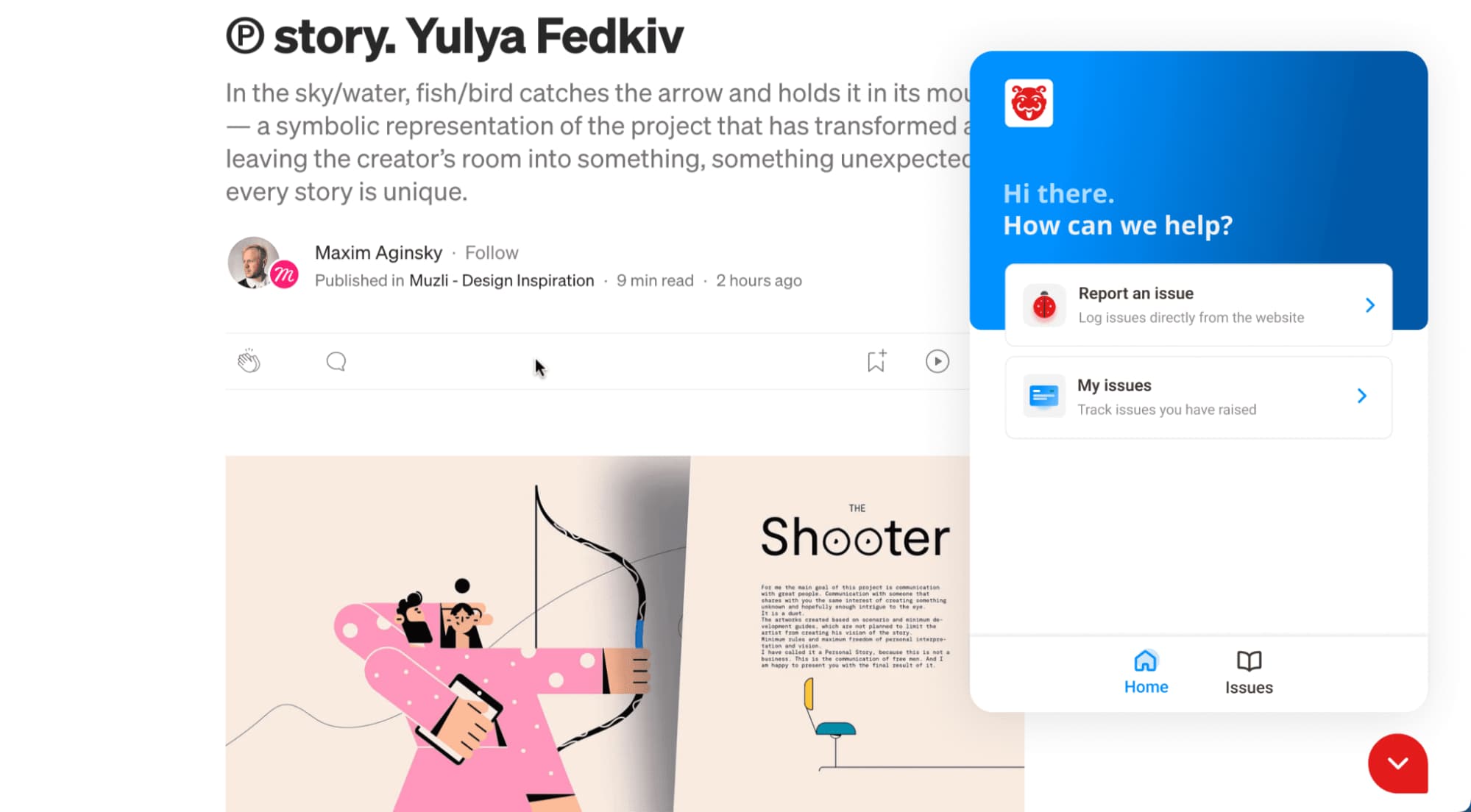
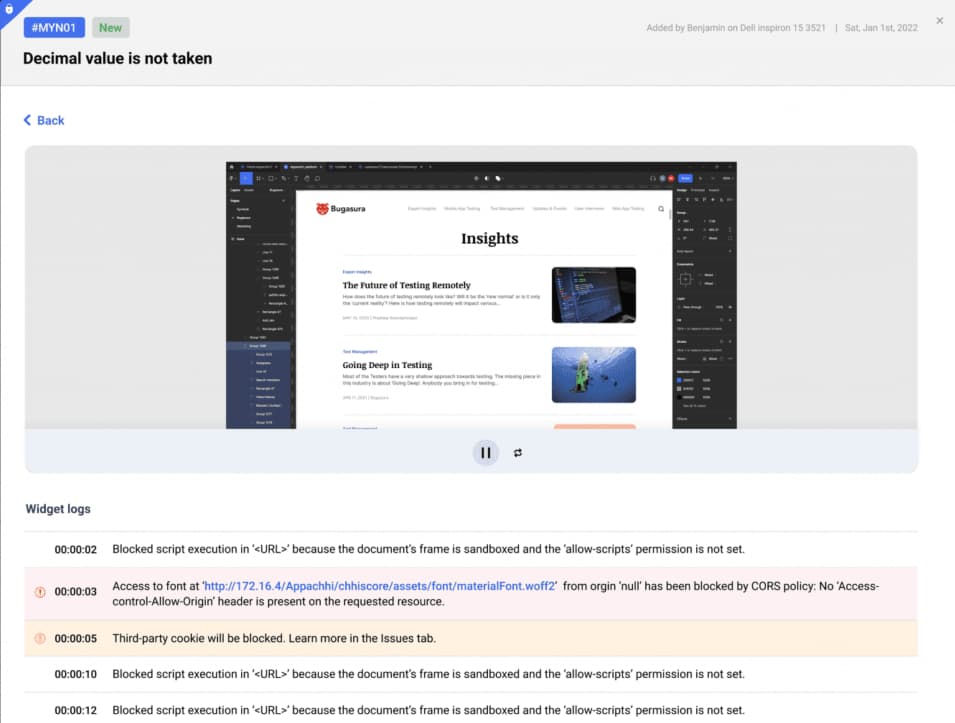
After the chat, a ticket is created in Bugasura’s issue tracker, with the platform automatically adding context with a limited 20-second video recording of the user’s actions.
Also, the associated console logs before the user clicked the widget are also recorded.
Compared to Shake, where the reporting tool is designed to work for both internal QA teams and end users, Bugasura’s reporter is more oriented toward testers.
The Chrome extension in particular is built for people running manual test sessions, where it records in the background and auto-generates the description when a bug is flagged.
It’s worth noting that Bugasura currently has no mobile SDK for iOS or Android, so it only covers web and web app testing.
That being said, pricing is notably generous.
The free tier includes unlimited users, unlimited projects, the Chrome reporter, the web widget, and all integrations.
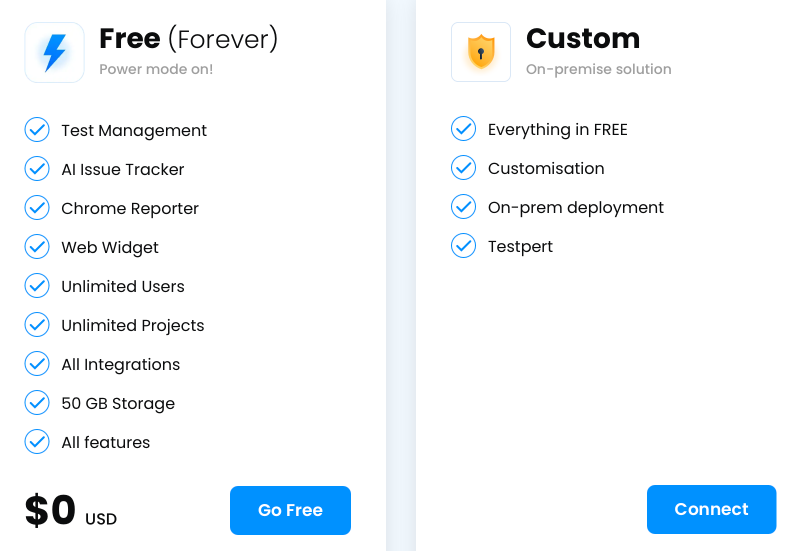
From the 6th team member onwards, the price is $5 per user per month.
The free plan comes with 50 GB of storage, which is a reasonable ceiling for most small and medium teams.
Bugasura is a solid option for QA-focused teams that want test management and bug capture in one place.
However, if you’re looking for a standalone bug reporter with deep AI capabilities that can run on mobile devices, that’s not quite what Bugasura is.
Jam is a browser-first bug reporting tool built for speed.
The core idea is simple: click a button, capture what happened, and send a complete report to your developers without writing anything manually.
It’s lighter and simpler than a tool like Shake or Luciq, and has no ticket management system, but that simplicity is part of the appeal for teams that just want frictionless capture.
Key features:
As shown below, Jam’s bug capture is focused on screenshots and recordings, with link shareability built in.
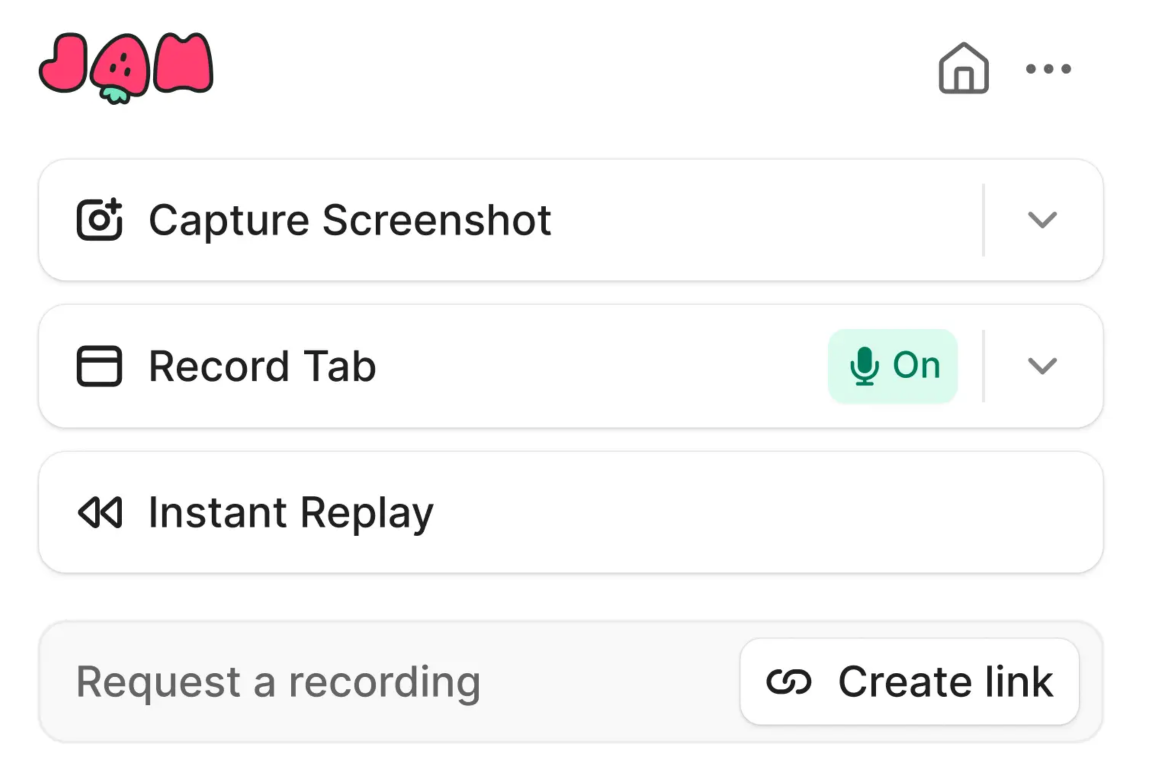
When a user captures a bug, Jam works in the background to collect device and browser data.
This data includes console logs, network requests, reproduction steps, and backend traces, without the user having to do anything beyond triggering the capture.
When it comes to writing the report, the AI generates a title and a structured list of reproduction steps automatically, based on the recording.
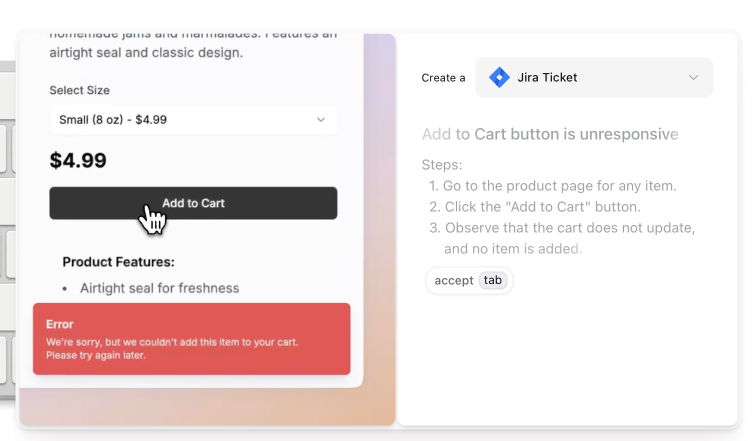
Importantly, AI repro steps are not available for screenshot reports.
And that covers the main AI functionality in Jam.
Unlike more complete systems, there’s currently no triage assistance, no priority suggestions, and no categorization, so reported bugs will still need manual review.
Jam’s web bug reporting is handled through the Chrome extension, and there’s an iOS app that follows the same reporting flow.
That said, there’s no Android support, which is a gap for teams working on native Android apps.
On pricing, the limited free tier includes 30 Jams per month along with 5 trial uses of AI features.
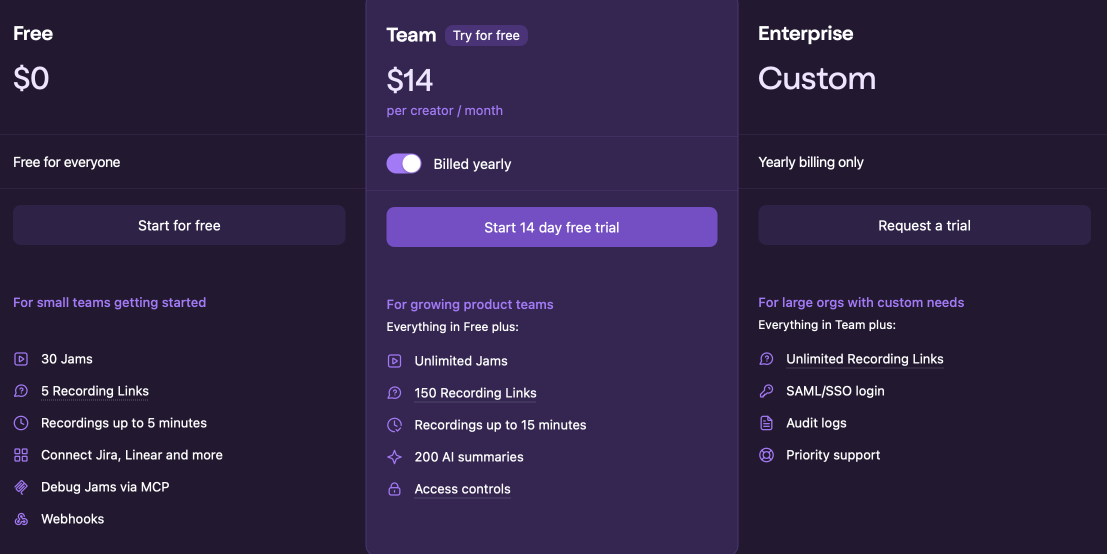
If you’re looking at Jam for the AI features, unlimited AI summaries are only available on the Enterprise plan.
For teams that prioritize clean, fast video-based capture above all else and don’t need AI triage, Jam is one of the better options available.
Luciq was known as Instabug for over a decade, originally building its reputation as a mobile crash reporting and bug tracking tool.
In September 2025, it rebranded and repositioned itself around what it calls Agentic Mobile Observability, which is a shift toward proactive, AI-driven monitoring rather than reactive bug reporting.
If you’re primarily looking for a bug reporting tool, Luciq’s current direction may be broader than what you need.


Capture, Annotate & Share in Seconds with our Free Chrome Extension!
Key features:
On the bug reporting side, Luciq’s in-app reporter is more basic than most other tools on this list, without AI-generated descriptions or auto-filled reproduction steps.
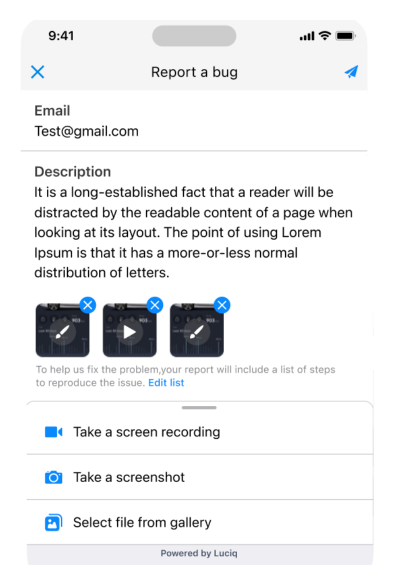
Even Luciq’s extended bug report only unlocks additional fields like the steps to reproduce the bug, actual results, and expected results, but the user still needs to fill these out manually.
That being said, the reports do include automatically captured data like screenshots and recordings, and the resulting ticket is detailed enough for most cases, as shown below.
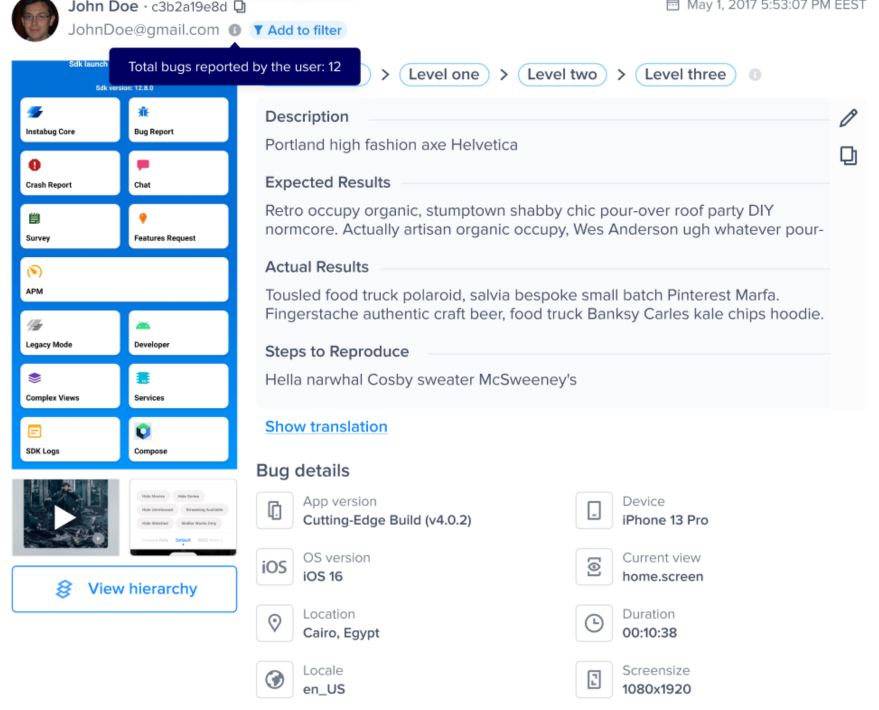
Where Luciq differentiates itself is not in how bugs are reported, but in how issues are detected and resolved.
Rather than waiting for a user to file a report, Luciq monitors live sessions and automatically identifies signals like UI elements that glitched, session patterns that indicate frustration, or crashes as they happen.
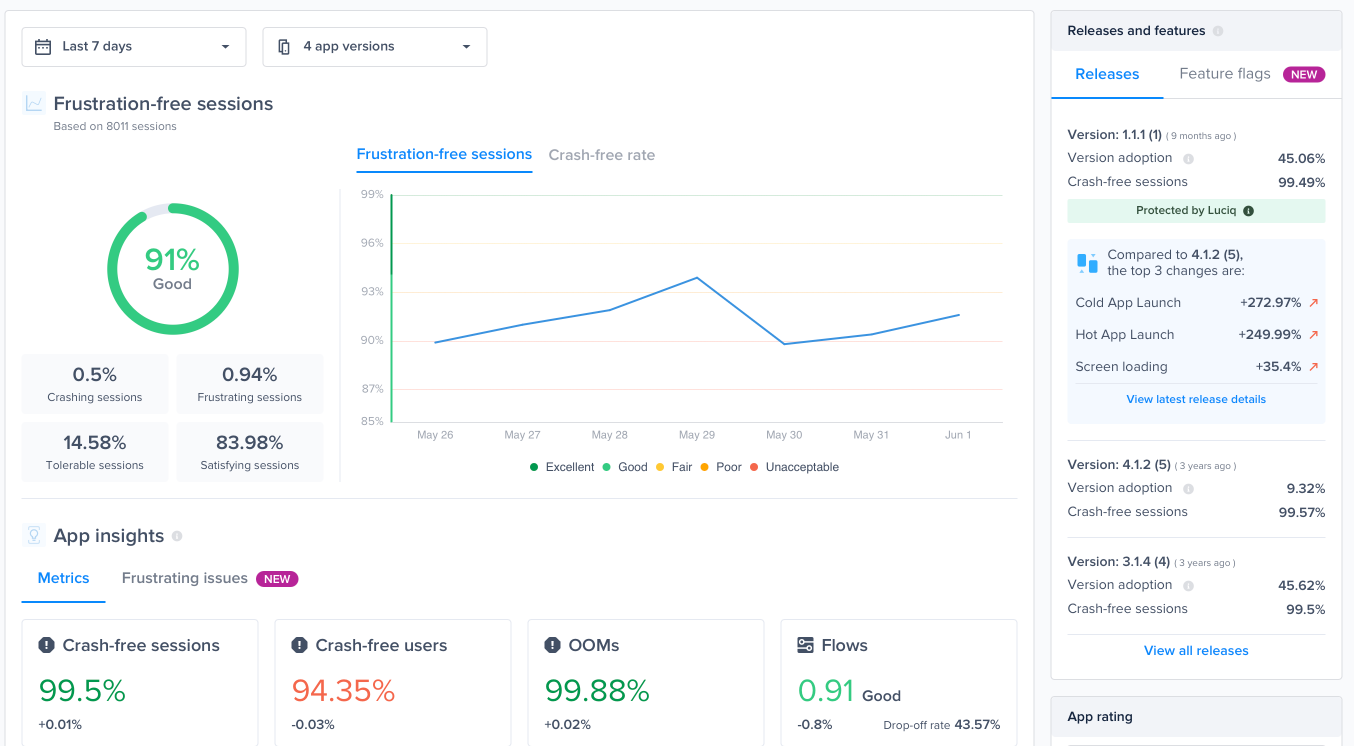
That data feeds into Luciq’s autonomous resolution layer, where AI agents can suggest or carry out fixes without requiring manual triage.
Compared to other tools on our list, where AI assists with the reporting and debugging workflow, Luciq goes further by attempting to detect and address issues before anyone reports them.
Pricing is not listed publicly and requires contacting Luciq directly.
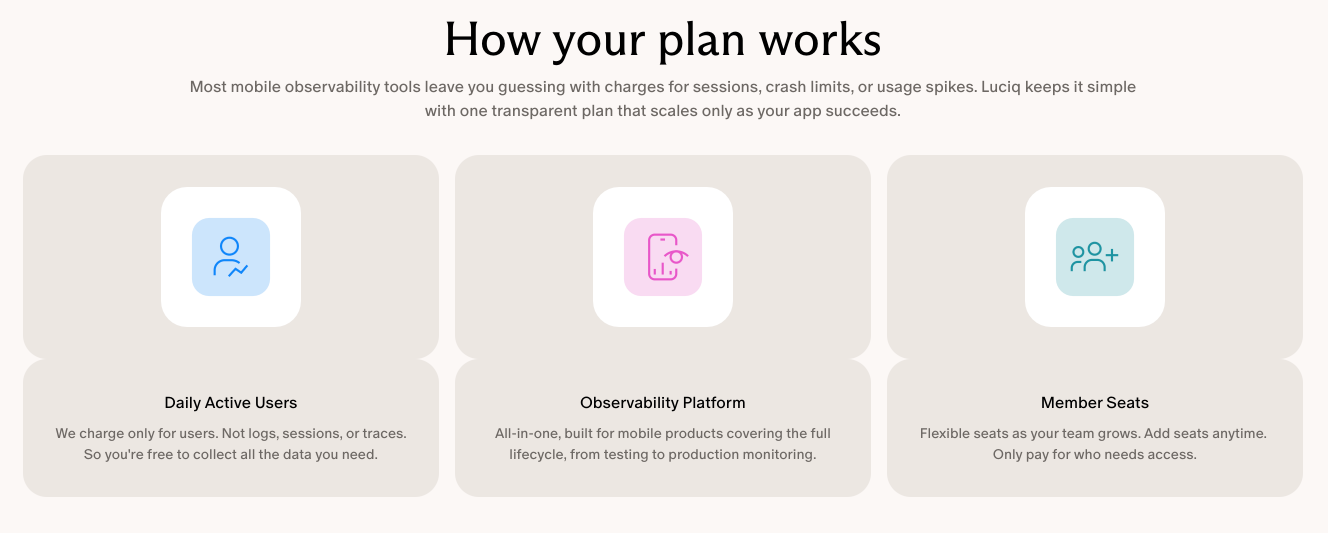
The model is based on daily active users (DAU) and team member seats rather than a flat monthly fee, which means pricing scales fast as your app grows.
For large-scale apps, this can work in your favor, but smaller teams may find the complexity and the lack of transparent pricing a barrier to getting started.
To summarize, Luciq is best suited for teams that need a comprehensive observability platform, and teams needing robust AI-driven bug reporting should look at the other options on our list.
Finally, we have Bugsee, a focused bug and crash reporting tool that keeps things fairly simple.
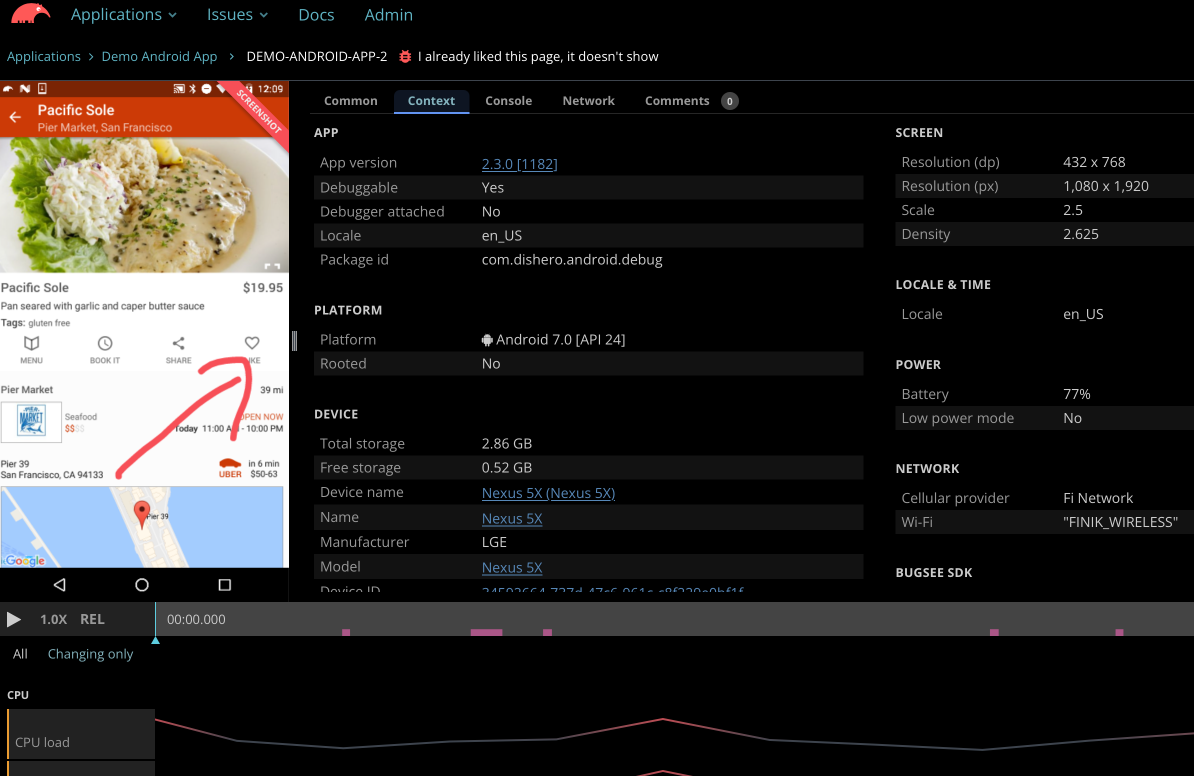
It’s built around one core strength: automatic video recording of everything that led up to a bug, synchronized with network logs, console output, and device data.
Key features:
Bug reporting in Bugsee follows a simple manual flow for iOS and Android, where users submit a report with a description, severity level, and optional screenshot annotation.
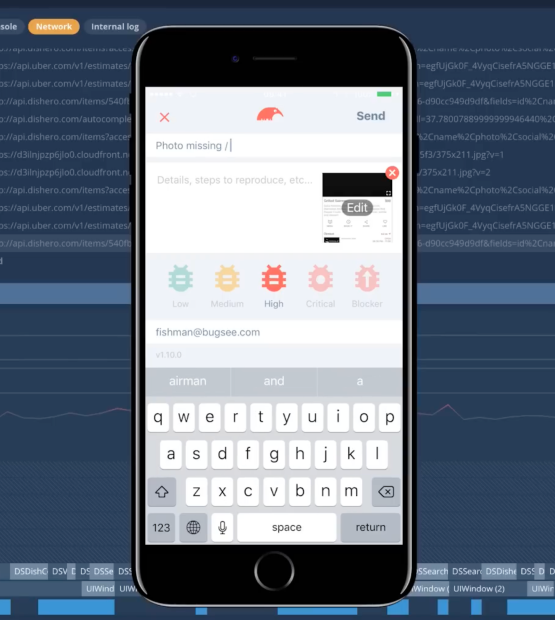
Unlike tools like Shake and Jam, there’s no AI assistance at the point of capture, meaning users write descriptions manually, and there’s no auto-generated reproduction steps.
The final ticket comes with synchronized video of what the user was doing, network traffic data, console logs, and system traces.
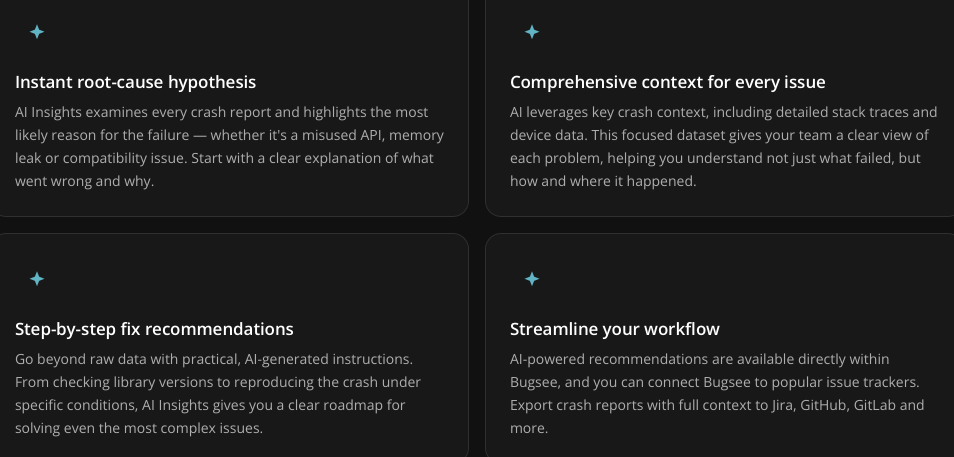
The AI in Bugsee comes into play after the report is submitted, through a feature called AI Insights.
It analyzes the crash report, examines the stack traces and device data, and generates a plain-language explanation of the most likely root cause along with resolution steps.
Bugsee also has an MCP server, which lets you connect your crash data to AI agents for deeper debugging.
However, unlike Shake and Jam, which enrich the initial bug reports, Bugsee lacks that initial layer of context, meaning the AI agents have less to work with.
Pricing starts with a free tier for up to 5 devices, and paid plans start at $199/month.
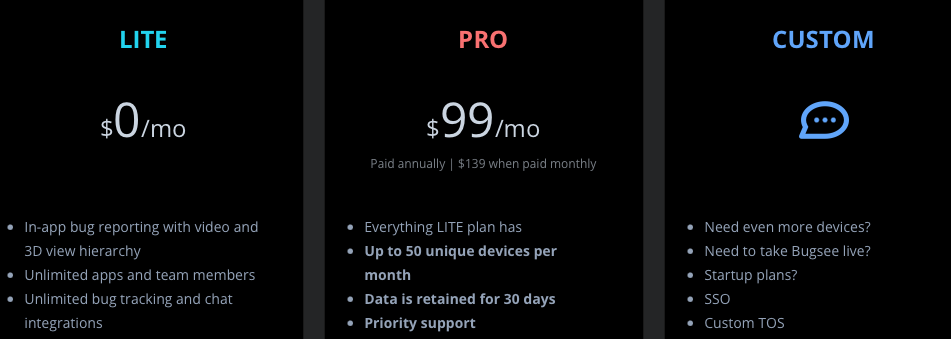
All plans include unlimited apps and team members. But data retention is only three days on the free tier and 30 days by default on paid plans, with longer retention available as an add-on.
All in all, Bugsee is a good fit for mobile app teams that want reliable video crash reporting and AI report analysis, without the complexity of a more feature-rich platform.
That covers our look at some of the top AI-driven bug reporting tools available right now.
Each one approaches the problem a bit differently, with its own strengths depending on your team’s size, setup, and workflow needs.
Hopefully, you now have a clearer picture of what’s out there.
Use that to narrow down your options and test the ones that seem like a good fit for your setup.
From internal bug reporting to production and customer support, our all-in-one SDK gets you all the right clues to fix issues in your mobile app and website.
We love to think it makes CTOs life easier, QA tester’s reports better and dev’s coding faster. If you agree that user feedback is key – Shake is your door lock.
Read more about us here.

Add to app in minutes

Doesn’t affect app speed

GDPR & CCPA compliant

Unexpected things pop up
Just like bugs in your app or web 🐛 Fix them now with just one reporting tool.
