


Steps to automate bug triaging with AI
Key takeaways:
Bug triage is one of those processes that quietly eats up developer time.
Sorting, classifying, prioritizing, and assigning issues takes resources and effort that could be directed toward improving an app.
If you’re looking for ways to make triage faster and more accurate, AI-driven triage offers real improvements across the board.
In this article, we’ll cover five specific ways AI enhances bug triage and ultimately helps improve app quality.
Table of Contents
A key way AI improves bug triage is by speeding up the time it takes for a reported issue to be assessed and reach the debugging stage.
These efficiency gains are a much-needed change in how teams handle bugs and errors.
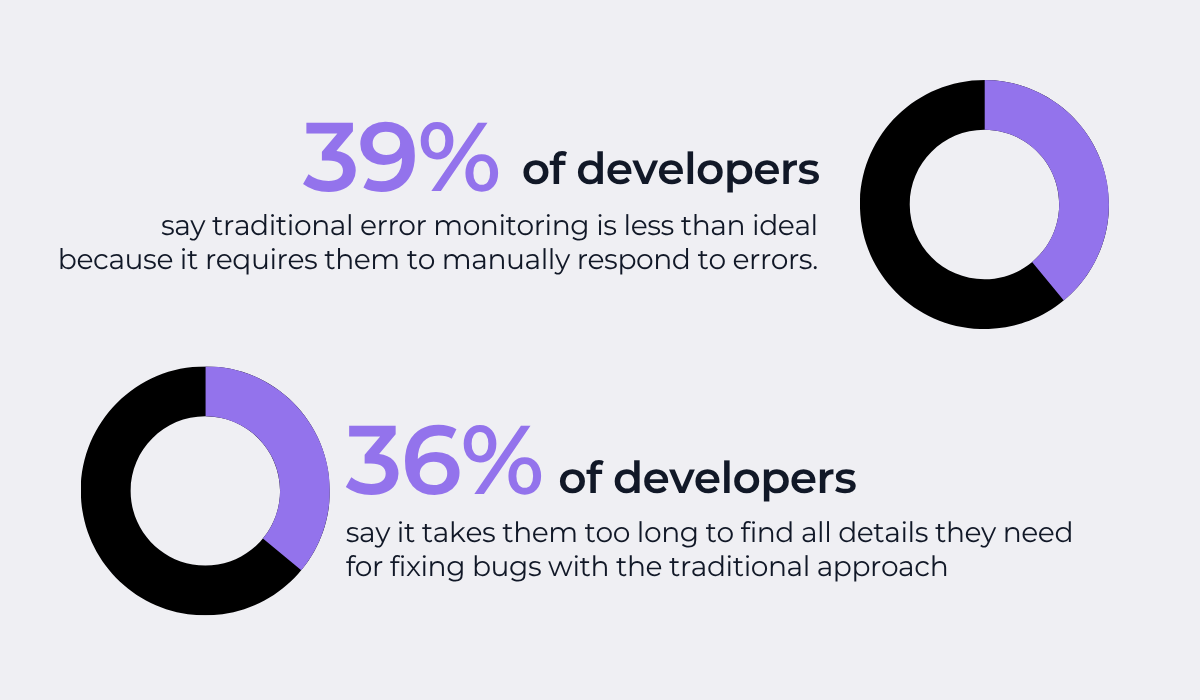
In fact, data from Rollbar reveals that 88% of developers are dissatisfied with the typical ways of dealing with bugs and errors.
As shown below, over a third believe these processes are both inefficient and take too much manual work.
As the surveyed developers reveal, they believe they could be deploying app updates more frequently, but bug-related bottlenecks hold them back.
In other words, slow bug triage means less time spent on actual app improvements.
Take everything that’s typically required in a manual bug triage process.
The issue needs to first be assessed whether it’s actually a bug, a duplicate report, or even whether it has already been fixed in a recent release.


Get unreal data to fix real issues in your app & web.
Only then can the bug be evaluated and prioritized, often requiring input from multiple stakeholders like product managers, QA leads, and senior developers.
With AI tools, these steps can be optimized.
To illustrate what we mean, take Shake’s Sheldon AI assistant.
Sheldon is an AI-powered tool built directly into Shake’s bug reporting dashboard.
For every ticket added to Shake, the Sheldon Box appears and automatically summarizes the bug, analyzes the technical context, and suggests a classification.
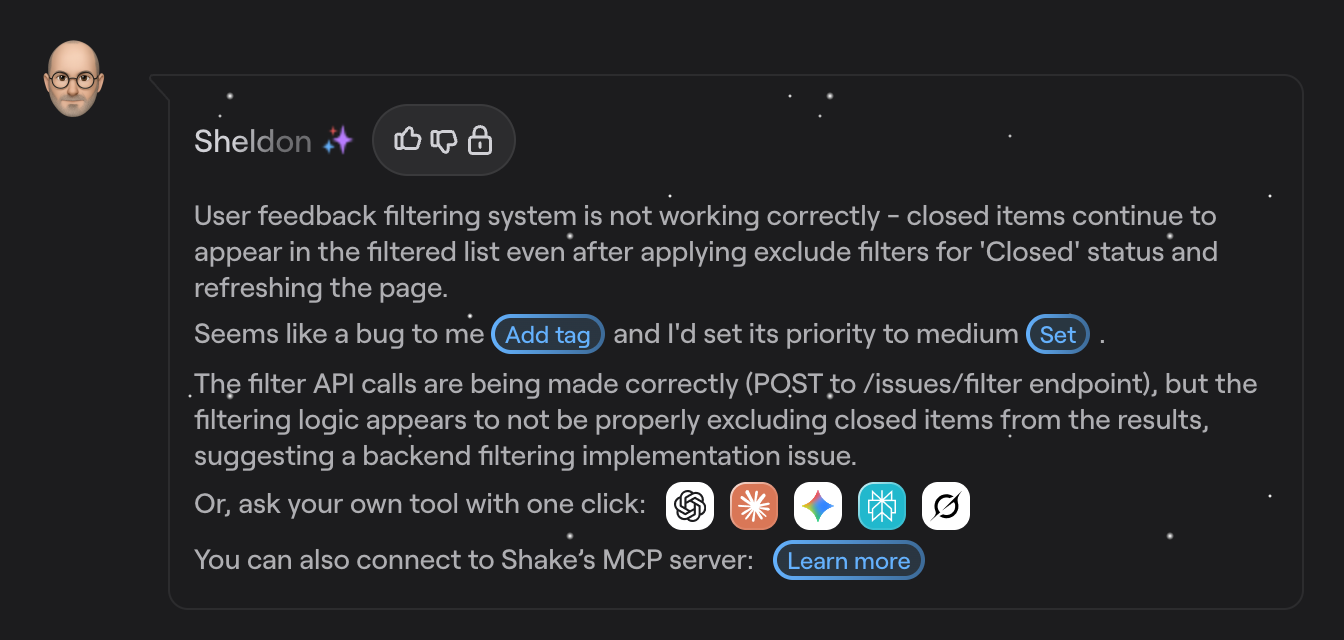
With built-in AI shortcuts, issues can immediately be categorized as a bug, question, suggestion, or spam, and an initial priority level can be set with a single click.
This means irrelevant tickets are sorted out right away, and the team’s attention shifts directly to tickets that are identified as high-priority bugs that actually need fixing.
And if more context is needed or your team uses other AI agents, Shake uses an MCP server that connects your ticket data directly to external AI tools.
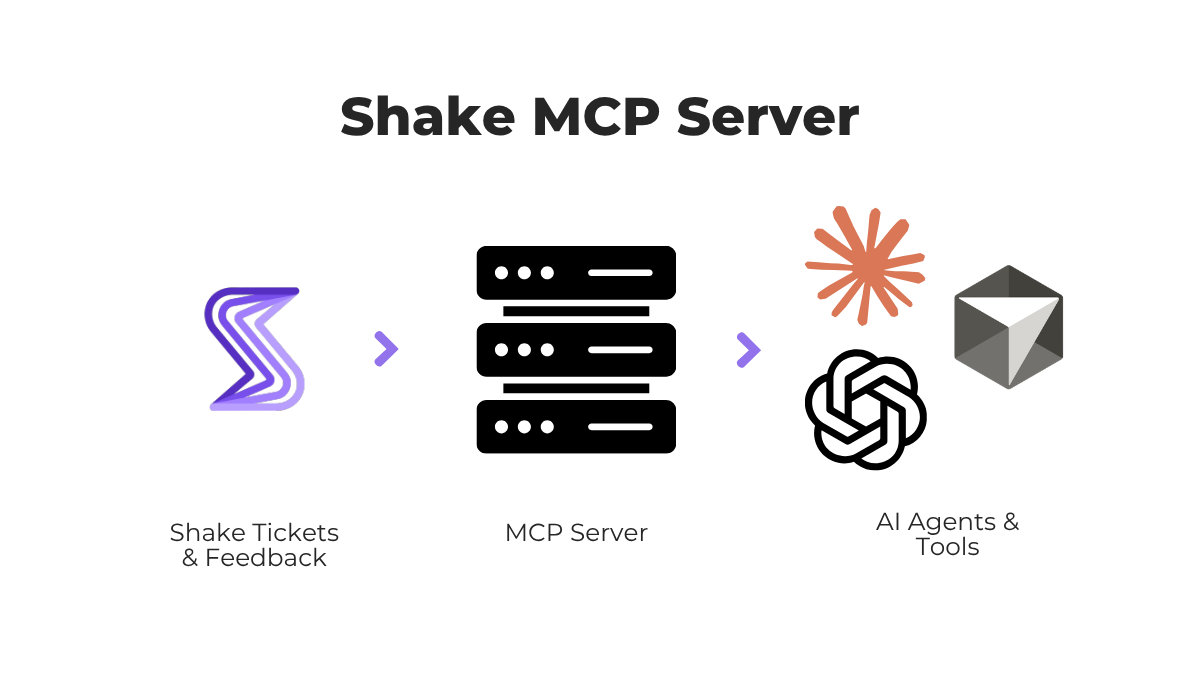
Through this connection, you can start analyzing and fixing issues while having the full ticket context for the AI tool.
You could ask the AI tool for some of the following:
In short, with these AI capabilities, developers can identify a bug and jump to debugging in minutes, rather than waiting for the next triage meeting for a plan.
Despite the speed gains, it’s important to understand that AI-driven bug triage doesn’t sacrifice accuracy, especially when it comes to assessing the impact of a bug.
When a new issue ticket is fed into an AI triage tool, it works with the same context and information that would be used in a typical manual triage process.
The difference is that these systems can process all of that context simultaneously, without the inconsistencies that come from different team members assessing the same bug differently.
Specifically, AI severity analysis looks at several signals to determine how critical an issue is, as shown in the image below.
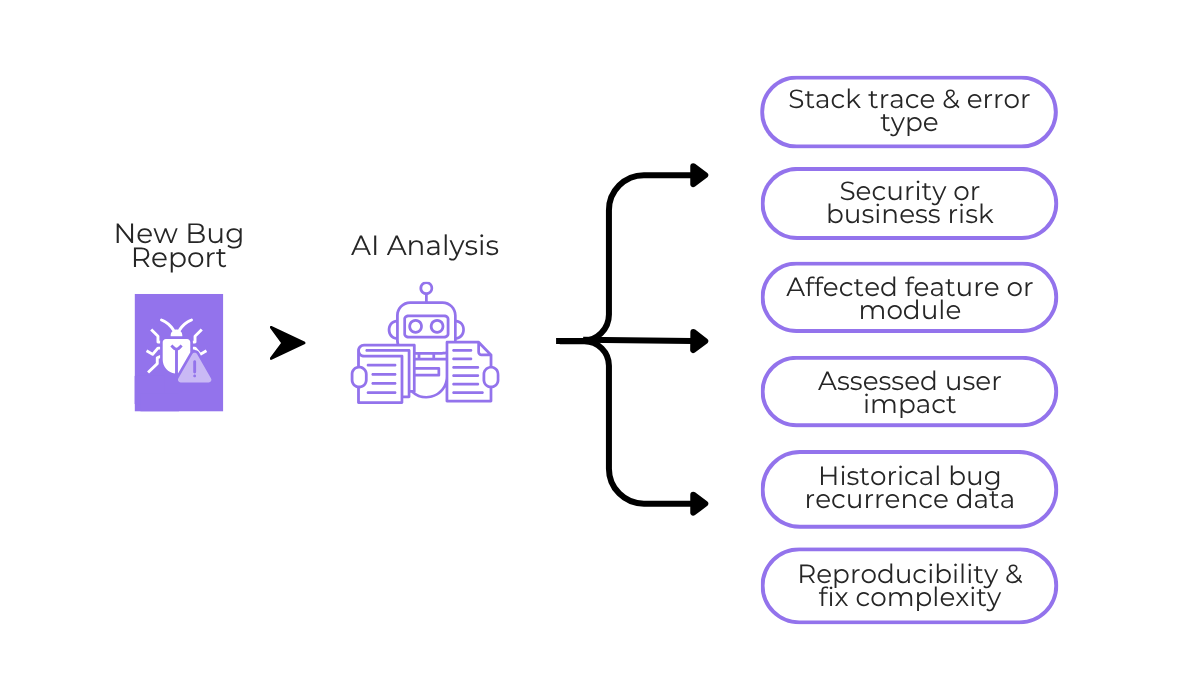
A robust system would be trained on and have access to historical bug data alongside past severity assessments.
It can then combine that data with information from the current bug report, which it analyzes using natural language processing (NLP), a technology for AI systems to accurately understand human language.
The result is a fast severity prediction based on solid data.
But the great part about some of these AI tools is that you can guide and direct the severity assessments based on your current priorities.
For instance, LogicBalls, an AI chat-based system, automatically asks for context and severity thresholds.
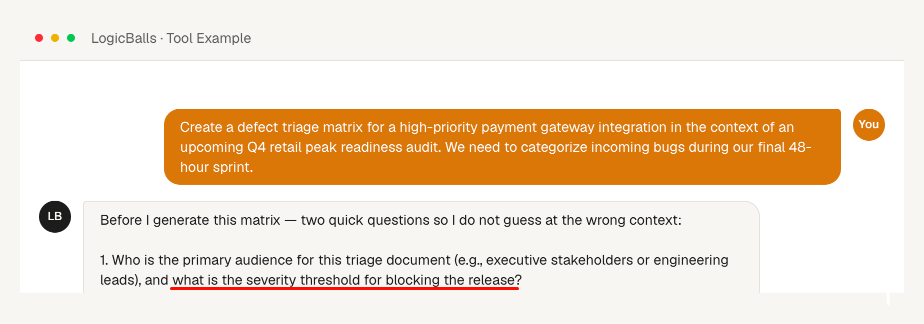
When the user provides this context, it can then create a custom framework with which it will categorize all incoming bugs
But what’s even more impressive is that AI capabilities don’t end at classification.
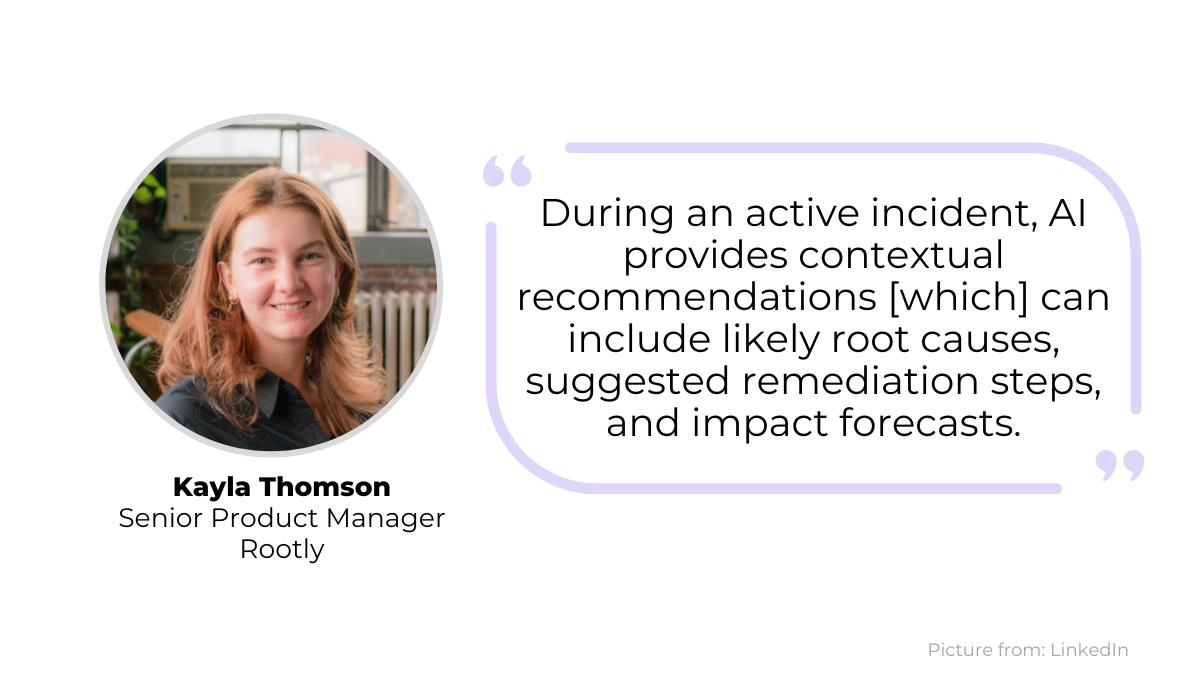
Writing on this topic, Kayla Thomson, Senior Product Manager at Rootly, explains that during an active incident, AI can automatically provide recommendations that go beyond what traditional bug triage covers.
For example, if a critical payment processing bug is detected, the AI could suggest likely root causes based on similar past incidents, recommend specific remediation steps, and even forecast the potential user impact.
These recommendations may or may not be acted on, but the advantage of using AI is that they’re available and can help guide developers toward the right next step.
Machine learning (ML) and AI systems also address duplicate reports, which are one of the most common issues in bug triage.
As an app grows in size and user base, it’s unavoidable that multiple people will report the same issue, especially if it’s a visible, user-facing bug.
Large projects are not exempt from this.
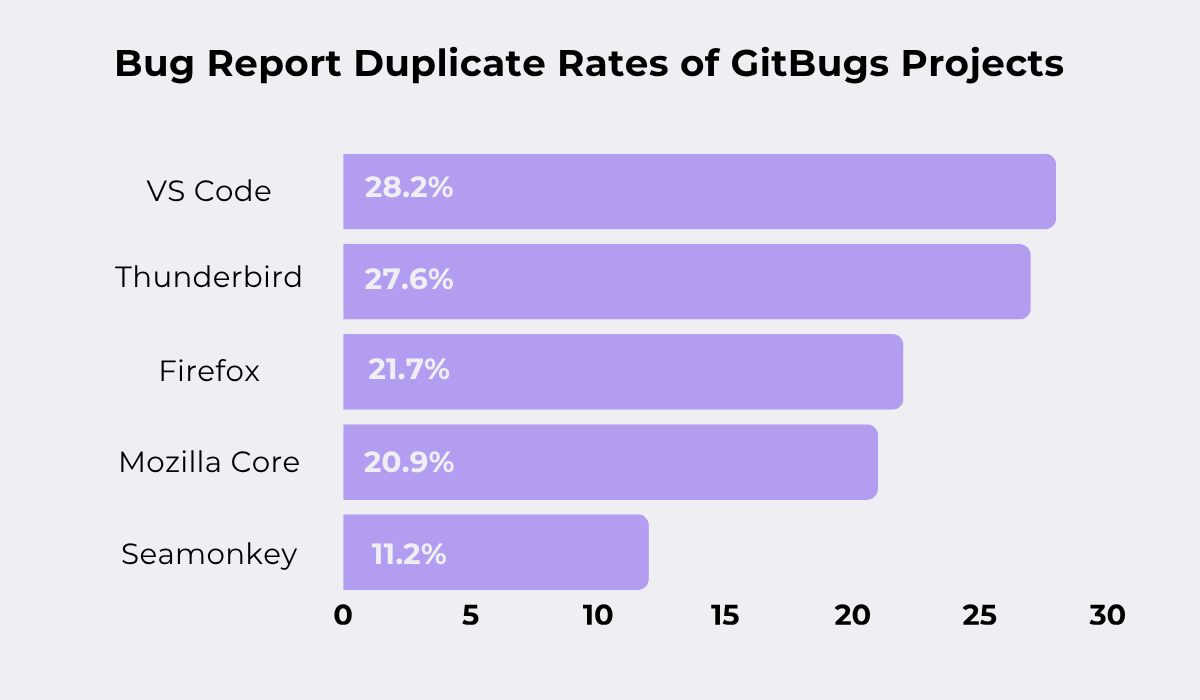
Consider the GitBugs dataset, which provides a collection of over 150,000 bug reports from projects like Firefox and VS Code.
Looking at the rate of duplicate reports across these projects, the results are significant.
To put this in perspective with a single example, VS Code received 32,829 bug reports a month, out of which 9,272 were duplicates.
That’s a huge volume of repeated issues that takes time away from developers during triage and prevents them from focusing on unique, high-impact fixes.


Capture, Annotate & Share in Seconds with our Free Chrome Extension!
The benefit of AI here lies in its ability to use NLP and semantic analysis to spot duplicates that traditional methods would miss.
For example, look at these two simplified bug reports shown below.
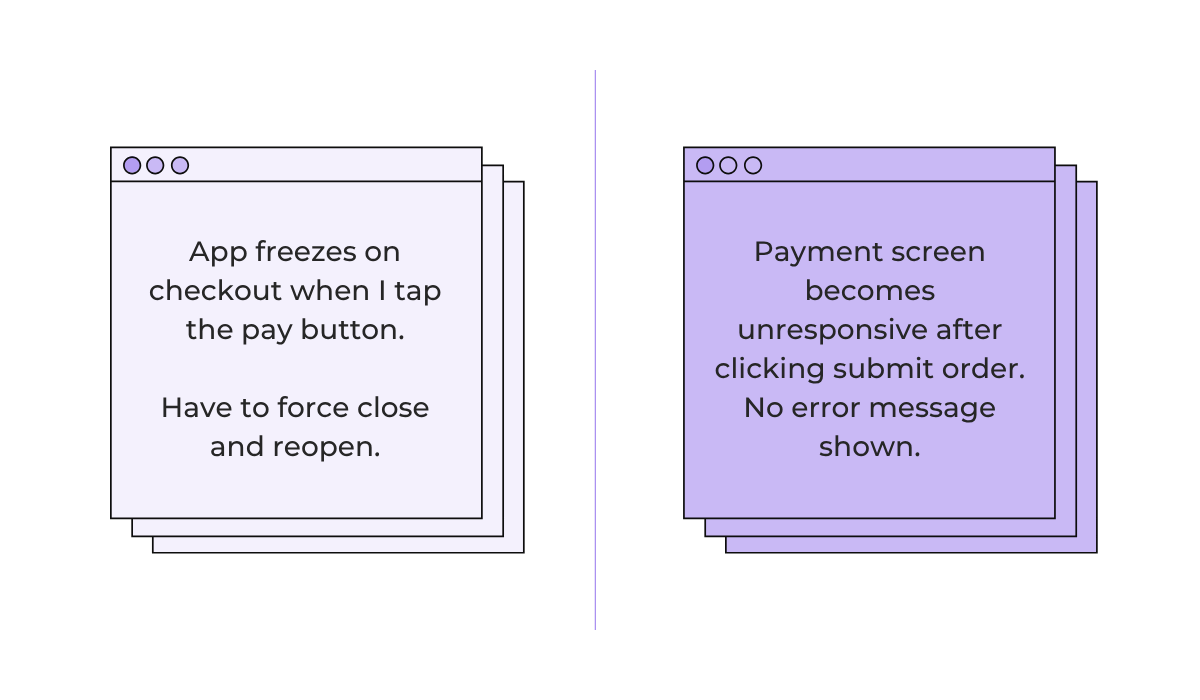
Both reports describe the same bug, but they share almost no words in common.
A keyword-based search wouldn’t flag these as duplicates.
A human reviewer might catch it if they’re familiar with the codebase, but with hundreds of incoming reports, these easily slip through.
AI works here because it uses content similarity metrics to compare the meaning behind reports, not just the surface-level text.
As a concrete example, Sami Foell and his team created an AI tool to address Google’s duplicate report problem on their Android Security Vulnerability Rewards Program (VRP).
The VRP rewarded users for submitting bug reports with a monetary reward, which naturally led to a flood of daily submissions, with 90% of them being duplicates.
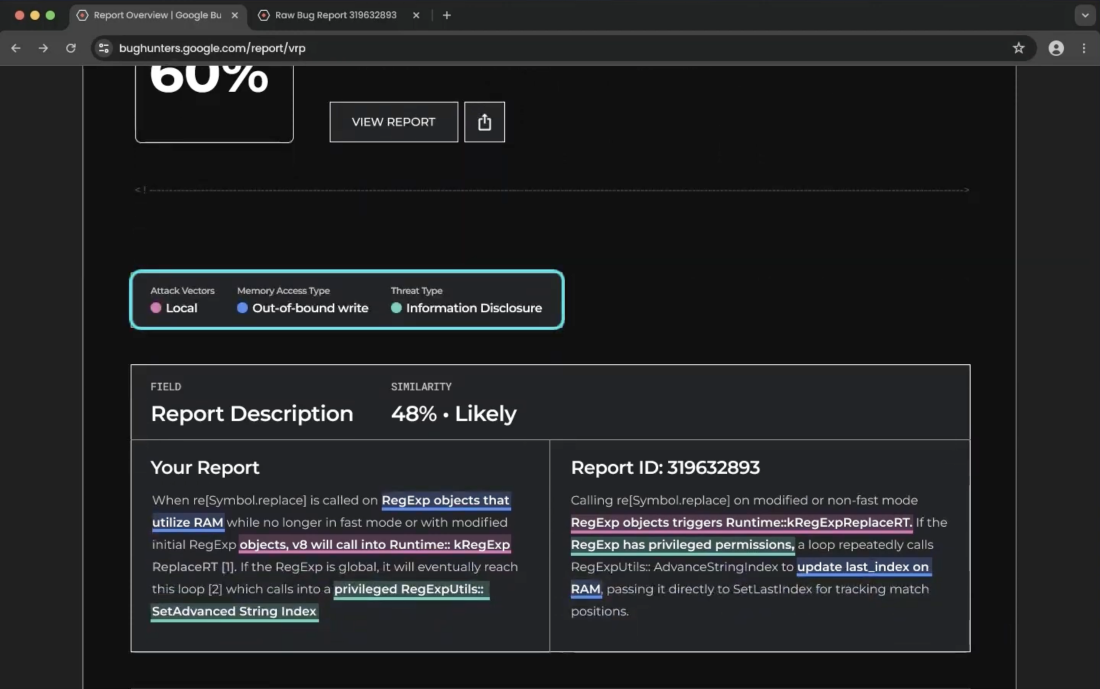
The AI tool could analyze new bug reports and compare them against existing report data before the submission was even finalized.
Using similarity analysis, the tool provided side-by-side report comparisons, allowing reporters to quickly refine or withdraw their submission, resulting in a 40% increase in deduplication accuracy.
Ultimately, tools like these make it far more likely to surface genuinely new and severe issues instead of spending time cleaning up duplicates.
Once issues are assessed and prioritized, AI systems can also assign them to the right teams or developers for debugging.
Of course, automatic task assignment is not a new concept.
Platforms like Jira already offer rule-based automations that take a set of conditions and assign tasks to team members based on predefined logic, as shown below.
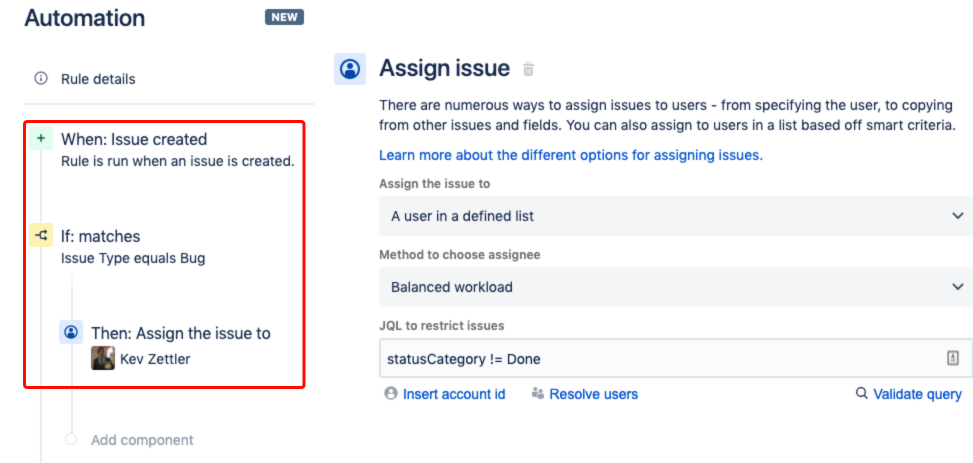
These rules can be quite effective for straightforward scenarios, like routing all bugs of a certain type to a specific developer.
But they can also be rigid as they rely on exact conditions and don’t adapt when team structures change or when a bug doesn’t fit neatly into a predefined category.
AI systems take a different approach by considering several aspects when making assignment decisions, some of which are shown below.
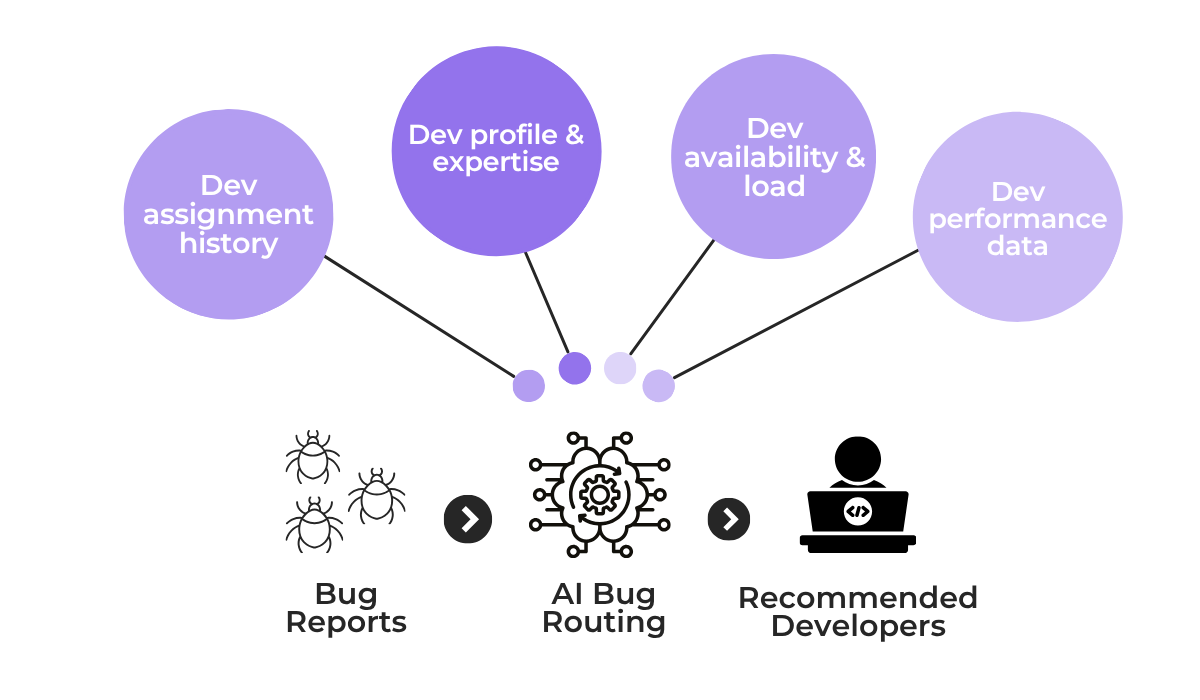
By analyzing all these factors and adapting accordingly, AI routing can make smarter decisions about who is best suited to handle each specific bug.
This reduces the number of times an issue gets reassigned before someone actually starts working on it.
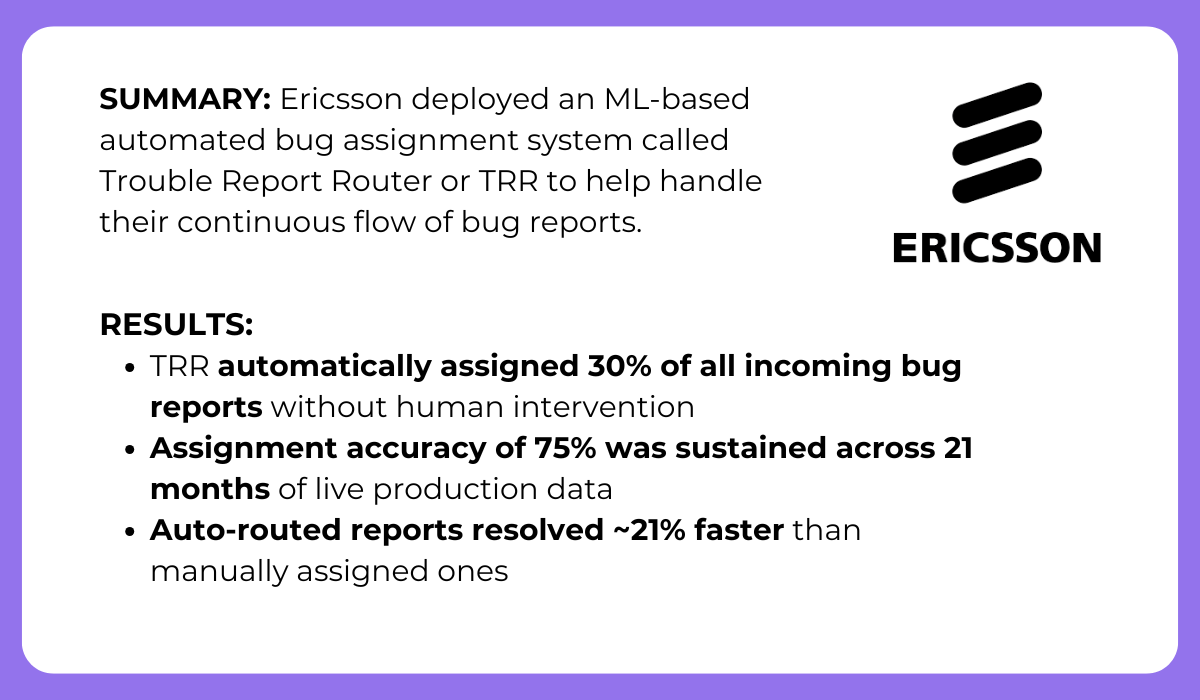
A real-world example of this in action comes from Ericsson, which deployed a machine learning-based automated bug assignment system called Trouble Report Router (TRR) to handle its continuous flow of bug reports.
TRR was a very specific solution built for Ericsson’s scale and needs.
It was trained on their internal data and fine-tuned over 21 months of live production use to great success.
But the principle behind it applies broadly. Namely, when AI has access to enough historical assignment and resolution data, it can make accurate routing decisions that save significant time.
The result is that bugs reach the right developer faster, with fewer handoffs and less time spent deciding who should work on what.
Finally, with the rich data AI has access to, it can also predict and flag potential issues before they cause harm to an app.
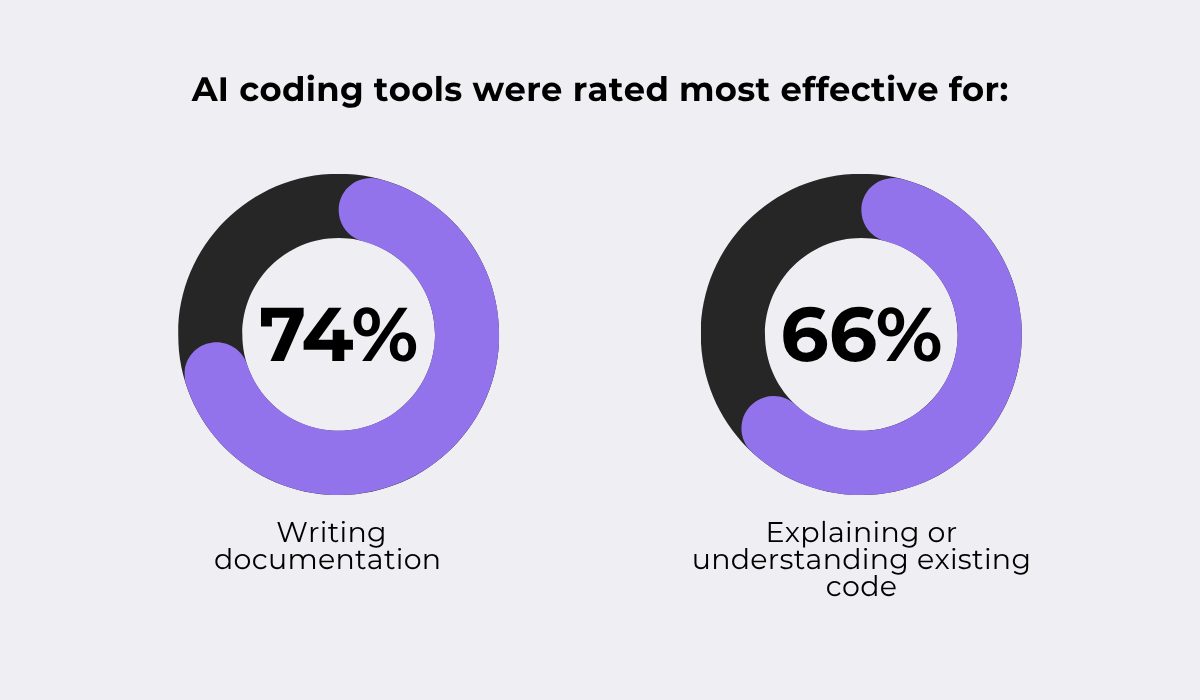
Interestingly enough, while AI has a high adoption rate in helping developers write code, it’s actually rated as more useful for understanding and analyzing existing code.
This is the insight from Sonar’s State of Code Developer Survey, where they found that developers rated AI tools as most effective for writing clear documentation and explaining existing code.
While 90% of the surveyed developers used AI for writing code, these two areas were where they found the most value, and that directly translates to bug prevention.
After all, when code is well-documented and easier to understand, developers are less likely to introduce bugs when modifying or extending it, and existing issues are easier to spot during code review.
But that’s only aiding code structure and clarity.
Some specialized AI tools can actually identify high-risk areas in existing code by analyzing data from multiple sources, as shown below.
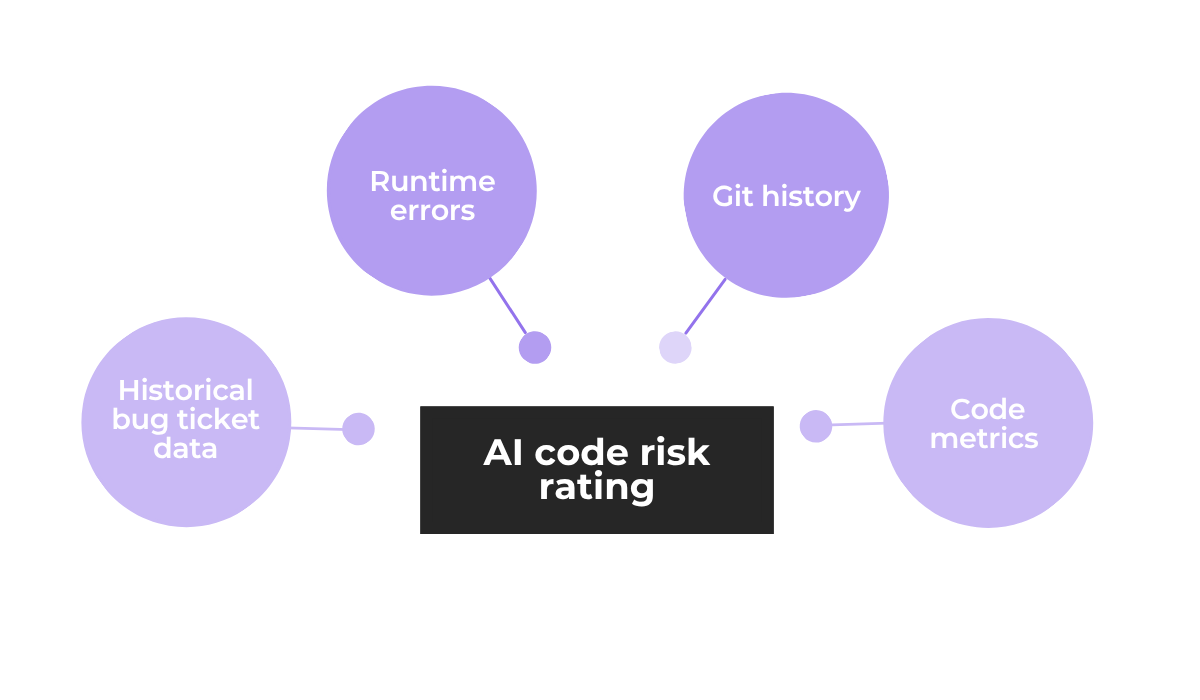
This works because areas of code that have historically produced the most bugs, receive the most frequent changes, or have high complexity are much more likely to produce issues in the future.
When these risk areas are flagged by AI, developers can proactively address and monitor them before they lead to production incidents.
For certain types of issues, AI systems can go even further and handle problems with little to no developer intervention.
A tool like CodeScene, for instance, uses machine learning algorithms to identify patterns and hidden risks in source code, combining version control data with code quality metrics.
On top of that, CodeScene has an AI-powered add-on that does real-time code health monitoring and automatically refactors code issues without major rewrites.
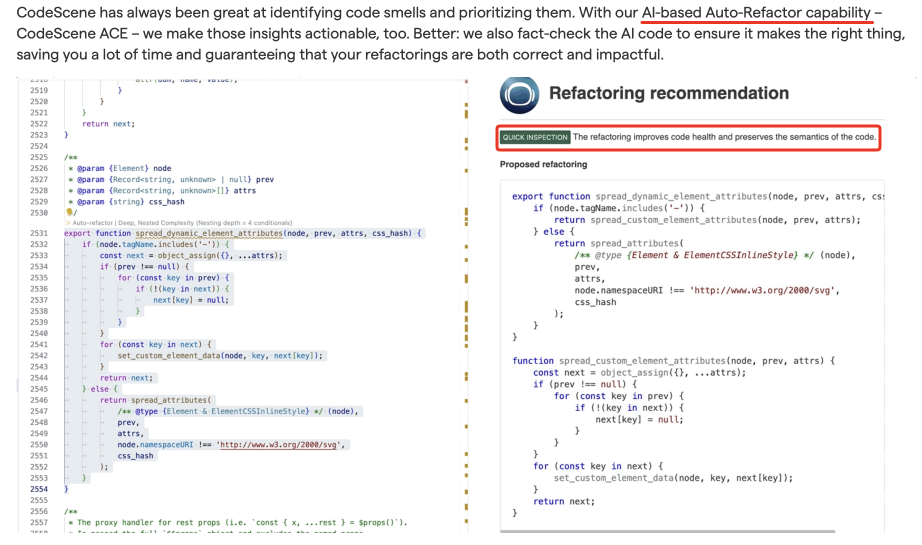
This combination of ML analysis and AI-powered refactoring means that code that would have led to potential bugs or maintenance issues is addressed during the development process itself, before it ever reaches users.
All of these capabilities shift the approach from finding and fixing bugs to automatically preventing them from being introduced in the first place.
That covers how AI-driven bug triage can improve your app’s quality.
We looked at how AI speeds up the triage process, improves accuracy in severity assessment and duplicate detection, and even helps prevent bugs before they reach production.
The overall theme is that AI handles the repetitive and time-consuming parts of triage, so your team can focus on building a better app.
As your next steps, you can look at what part of your current triage workflow would benefit most from these capabilities.
Start there, and build from it.
From internal bug reporting to production and customer support, our all-in-one SDK gets you all the right clues to fix issues in your mobile app and website.
We love to think it makes CTOs life easier, QA tester’s reports better and dev’s coding faster. If you agree that user feedback is key – Shake is your door lock.
Read more about us here.

Add to app in minutes

Doesn’t affect app speed

GDPR & CCPA compliant

Unexpected things pop up
Just like bugs in your app or web 🐛 Fix them now with just one reporting tool.